Winslop Unveils Native UI Overhaul
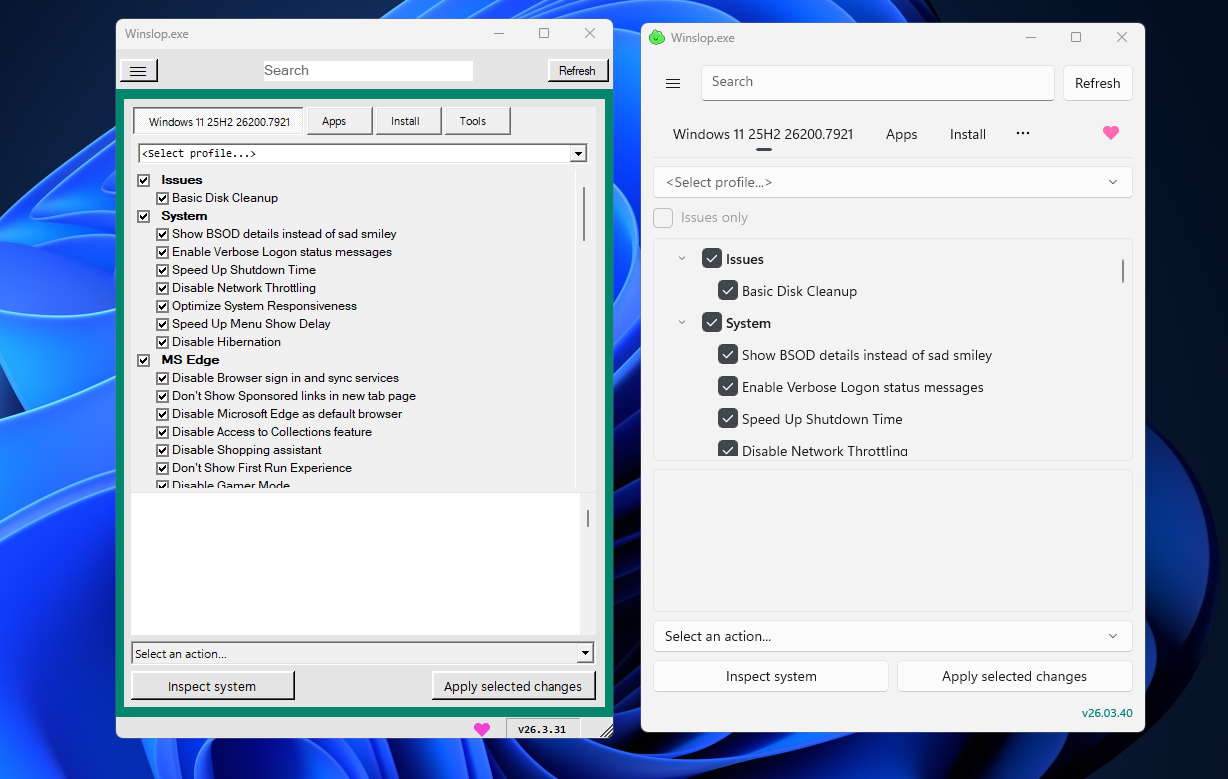
💡Easily strip AI bloat from Windows 11 with Winslop's sleek new native UI—ideal for dev setups.
⚡ 30-Second TL;DR
What Changed
Removes AI features and pre-installed components from Windows 11
Why It Matters
Enables power users to optimize Windows 11 for performance and privacy by stripping unwanted AI, potentially boosting productivity for developers.
What To Do Next
Download latest Winslop from its repository to test native UI and debloat Windows 11 AI components.
Key Points
- •Removes AI features and pre-installed components from Windows 11
- •Latest version features major native UI transformation
- •Gains popularity among users avoiding Microsoft AI integrations
🧠 Deep Insight
Background and context from public sources — not the original article. 8 sources cited.
🔑 Enhanced Key Takeaways
- •Winslop is an open-source tool hosted on GitHub under builtbybel, featuring a modular UI with categories like AI, Ads, Privacy, Edge, and Gaming for selective feature inspection and application.[1][7]
- •Version 26.02.02 adopts date-based versioning, enhances Windows version detection including UBR/OS builds, reduces memory usage, and adds taskbar tweaks such as hiding Copilot, removing Meet Now, disabling Widgets, and cleaning pinned items.[1]
- •It installs blocker packages to prevent removed components like AI features from reappearing via Windows Update, inspired by RemoveWindowsAI, though updates pose fragility risks.[1]
- •Winslop supports privacy enhancements by disabling telemetry, location tracking, activity history, tailored experiences, and system-wide ads in areas like File Explorer, Start menu, and Settings.[2]
🛠️ Technical Deep Dive
- •Modular feature categories (e.g., AI, Ads, Privacy) allow inspection, selection, and application of changes via a graphical interface with 'Apply selected changes' button.[1][2]
- •Includes system inspection for removable apps, AI components (Copilot, Recall, Click to Do), and options to enable verbose logon, End Task, or disable Hibernation and Network Throttling.[2]
- •Taskbar modifications: restore left alignment, remove personalization, hide Copilot UI, unpin items, clear favorites, disable Widgets/News & Interests.[1][2]
- •Privacy tweaks: disable activity history, telemetry, location tracking; block ads in File Explorer, Lock Screen, Settings, Start; uses servicing store adjustments and blocker packages for persistence.[1][2]
- •Additional tools: undo last changes, load slop feeds, analyze logs online, Edge-specific debloating (disable Bing, search suggestions).[2][3]
🔮 Future ImplicationsAI analysis grounded in cited sources
⏳ Timeline
📎 Sources (8)
Factual claims are grounded in the sources below. Forward-looking analysis is AI-generated interpretation.
- windowsforum.com — Winslop a Compact Open Source Debloat Tool for Windows 11
- pureinfotech.com — Winslop Bloatware Windows 11
- youtube.com — Watch
- windowscentral.com — Winslop Users Still Turning to Third Party Tools to Bypass AI
- youtube.com — Watch
- xda-developers.com — Tired of Copilot Winslop Lets You Easily Purge Windows 11 AI Features
- GitHub — Features
- elevenforum.com — Winslop
Weekly AI Recap
Read this week's curated digest of top AI events →
👉Related Updates


AI-curated news aggregator. All content rights belong to original publishers.
Original source: cnBeta (Full RSS) ↗
This is a summary, not the original. Read the source, or get the weekly briefing.
Weekly AI briefing
One email a week. Unsubscribe anytime.