Firefox Project Nova: Major Redesign and Compact Mode Return
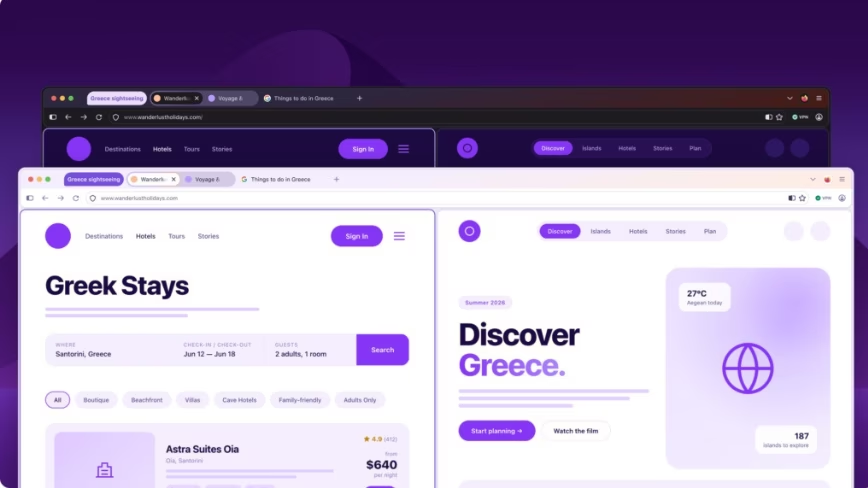
Understand how independent browser UI changes might impact your web-based AI application's user experience.
30-Second TL;DR
What Changed
Project Nova introduces a complete visual overhaul of tabs and icons.
Why It Matters
The redesign signals Mozilla's commitment to maintaining a distinct browser identity in a Chromium-dominated market. It may influence how power users perceive browser performance and UI customization.
What To Do Next
If you build web-based AI tools, test your UI compatibility with Firefox's new compact mode to ensure your interface remains accessible.
Key Points
- •Project Nova introduces a complete visual overhaul of tabs and icons.
- •Mozilla is reintroducing the popular 'compact mode' for power users.
- •The redesign aims for a warmer, faster feel without adopting the Chromium engine.
Deep Insight
Background and context from public sources — not the original article. 11 sources cited.
Enhanced Key Takeaways
- •Project Nova integrates AI features and enhanced customization options, allowing users to control elements like corner roundness and providing a 'kill switch' to disable AI-related functionalities entirely.
- •The redesign aims to address Firefox's declining market share, which was reported at 3.45% in the US as of March 2026, by offering a distinct user experience compared to Chromium-based browsers.
- •Project Nova will standardize UI/UX elements, including menus, panels, and controls, across both desktop and mobile platforms to ensure a consistent visual language.
- •The visual update introduces softer tab shapes, consistent rounded elements, updated icons, and a warmer color palette inspired by 'the feeling of fire.'
- •New workflow improvements are part of Project Nova, making features such as tab groups, split view, and vertical tabs more accessible to users.
Technical Deep Dive
- Project Nova is described as a 'renewal, not a replacement' of the existing user interface and experience.
- The design introduces pronounced rounding for tab buttons and the address bar field.
- UI elements like the tab bar, navigation bar, sidebar, and main web content area are grouped into distinct, rounded blocks, utilizing specific color shades and gradients to simplify visual hierarchy.
- The redesign aims for consistency by standardizing UI/UX elements across desktop and mobile devices.
- Users will have a 'kill switch' to disable AI-related features entirely within the browser settings.
- The underlying rendering engine, Gecko, remains independent, differentiating Firefox from many Chromium-based browsers.
Future ImplicationsAI analysis grounded in cited sources
Timeline
- 2004-11Firefox 1.0 released, challenging Internet Explorer's dominance.
- 2014-04Firefox 29 introduced the Australis interface redesign.
- 2017-11Firefox 57 launched with the Photon redesign and Quantum engine improvements.
- 2021-06Firefox 89 rolled out the 'Proton' redesign, focusing on removing visual clutter.
- 2026-03Early mockups of Project Nova, codenamed 'Nova,' began to surface.
- 2026-05Mozilla officially confirmed Project Nova, detailing its visual overhaul and features.
Sources (11)
Factual claims are grounded in the sources below. Forward-looking analysis is AI-generated interpretation.
Weekly AI Recap
Read this week's curated digest of top AI events →
Related Updates


AI-curated news aggregator. All content rights belong to original publishers.
Original source: The Next Web (TNW) ↗
This is a summary, not the original. Read the source, or get the weekly briefing.
The weekly digest
One email a week. Unsubscribe anytime.