Brand Your Embedded Amazon Quick Chat
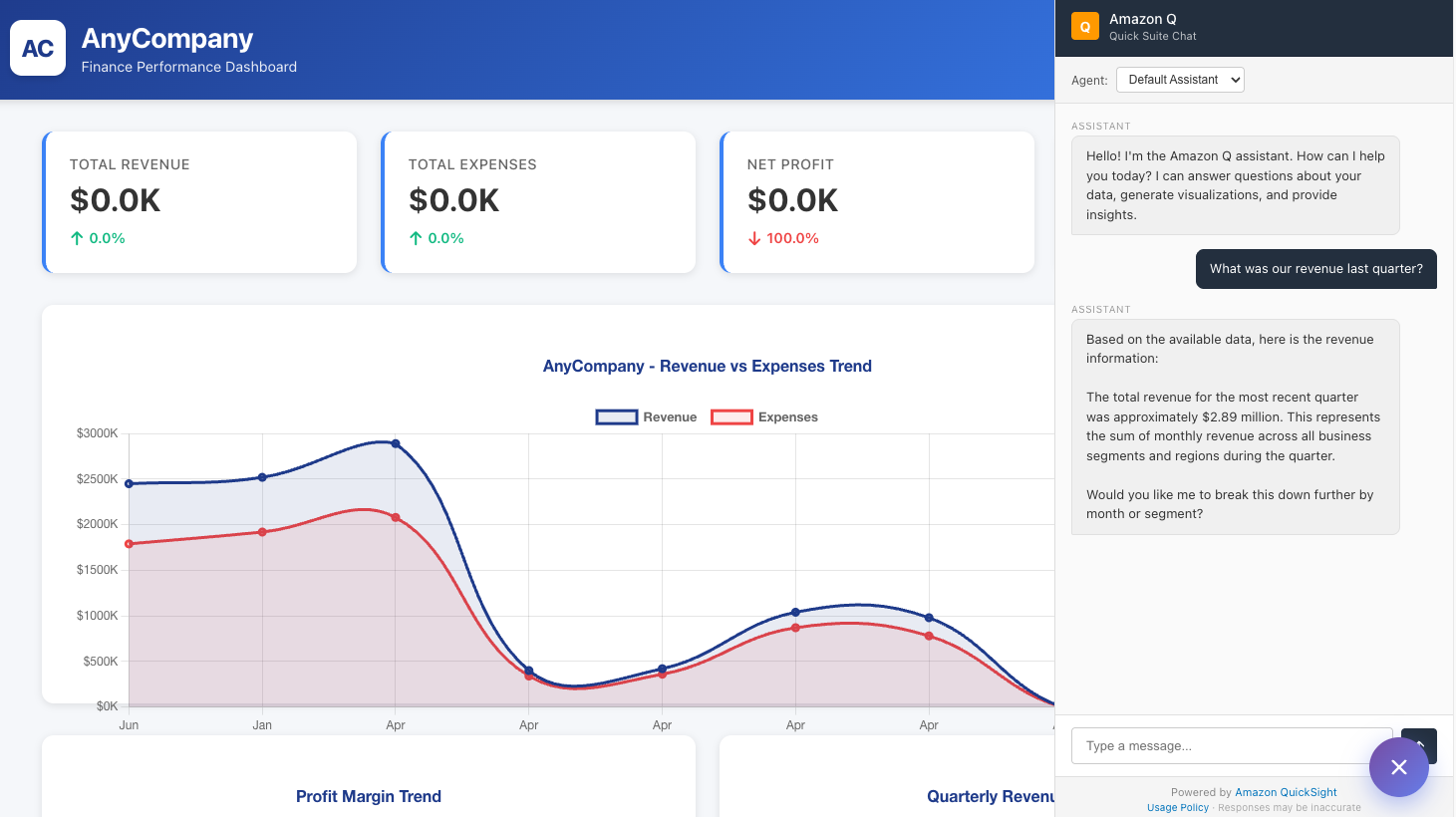
💡Learn how to embed a branded conversational AI assistant without building the chat UI from scratch.
⚡ 30-Second TL;DR
What Changed
Embed a conversational AI chat experience directly into a web application.
Why It Matters
Developers can deliver a more cohesive in-app AI experience without building a chat interface from scratch. Persona and branding controls may also improve user trust and adoption of enterprise assistants.
What To Do Next
Prototype Amazon Quick embedded chat in a staging web app and test container styling, branding removal, and persona settings against your design system.
Key Points
- •Embed a conversational AI chat experience directly into a web application.
- •Customize the chat container and SDK styling to match an existing interface.
- •Remove default branding and define a custom agent persona for consistent brand voice.
🧠 Deep Insight
AI-generated analysis for this event.
🔑 Enhanced Key Takeaways
- •The QuickSight embedded chat utilizes the Amazon Q generative BI capabilities, allowing users to query data using natural language directly within third-party applications.
- •Integration is facilitated through the Amazon QuickSight Embedding SDK, which supports secure, authenticated sessions using AWS IAM or QuickSight-managed users.
- •Developers can leverage the 'QuickSight Embedding SDK' to control the lifecycle of the chat interface, including programmatic opening, closing, and event handling for user interactions.
- •The branding customization features extend to CSS-level overrides, enabling developers to inject custom stylesheets to modify fonts, colors, and spacing to align with corporate design systems.
- •The agent persona configuration allows for the definition of system prompts, which govern the tone, behavior, and scope of the AI assistant's responses to end-users.
📊 Competitor Analysis▸ Show
| Feature | Amazon QuickSight Q | Microsoft Power BI (Copilot) | Tableau Pulse |
|---|---|---|---|
| Embedding Capability | High (SDK-based) | High (Power BI Embedded) | Moderate (Embedded Analytics) |
| Pricing Model | Consumption-based/User | Capacity/User-based | User-based |
| AI Model | Amazon Bedrock/Titan | OpenAI GPT-4 | Salesforce Einstein |
🛠️ Technical Deep Dive
- The embedding architecture relies on the QuickSight Embedding SDK, which generates a signed URL for the iframe-based component.
- Authentication is handled via the GenerateEmbedUrlForAnonymousUser or GenerateEmbedUrlForRegisteredUser API operations.
- Customization is achieved by passing a configuration object to the embedding SDK, which supports parameters for theme overrides and locale settings.
- The chat interface maintains state through the QuickSight session, ensuring that context is preserved across multiple turns in a single user session.
- Security is enforced through Row-Level Security (RLS) and Column-Level Security (CLS) policies defined within the QuickSight dataset, which persist even when embedded.
🔮 Future ImplicationsAI analysis grounded in cited sources
⏳ Timeline
Weekly AI Recap
Read this week's curated digest of top AI events →
👉Related Updates


AI-curated news aggregator. All content rights belong to original publishers.
Original source: AWS Machine Learning Blog ↗