Microsoft Tests Ask Copilot in Windows 11 Taskbar
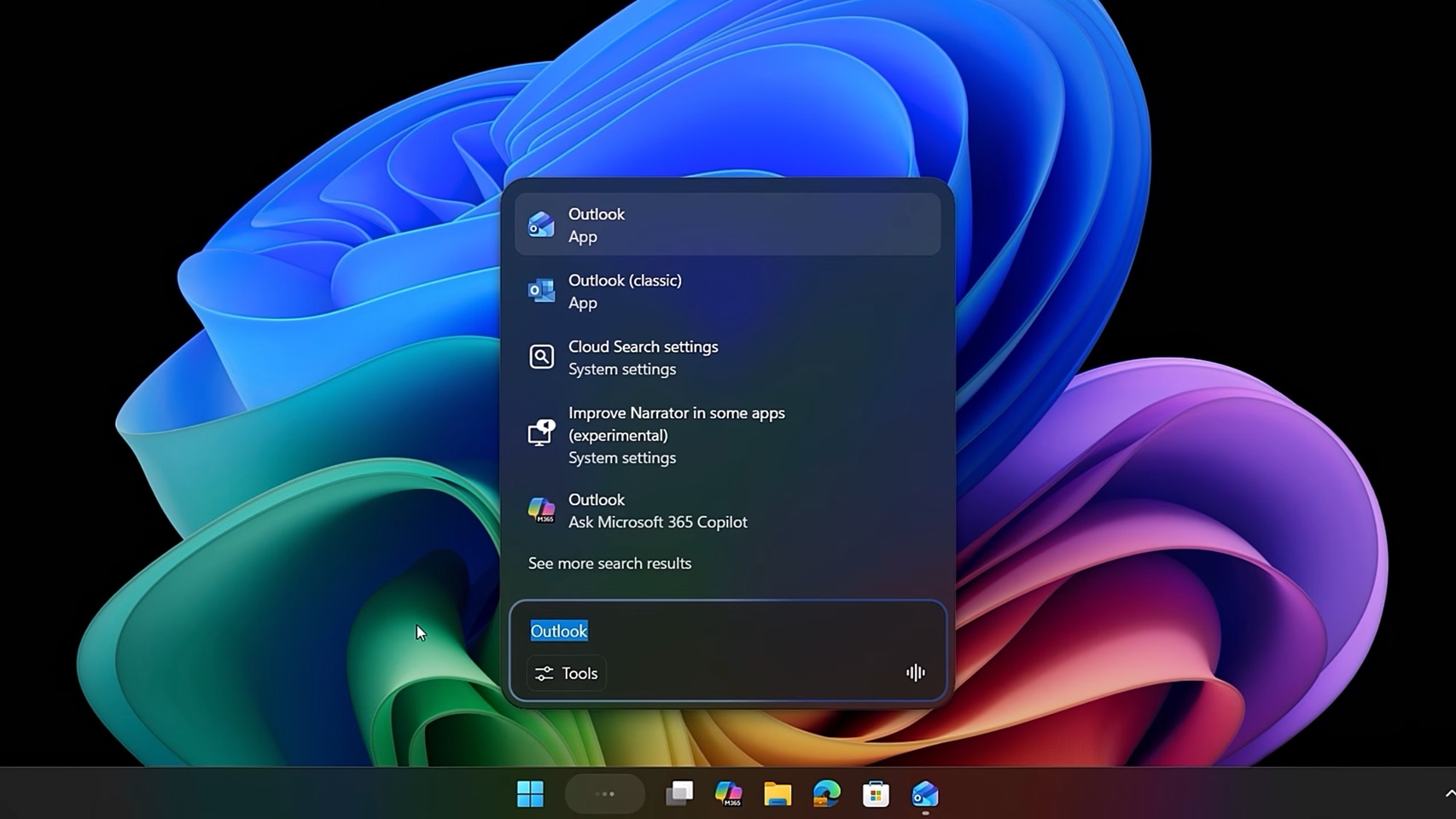
💡Windows 11 gets native Copilot in taskbar/File Explorer—test for daily AI productivity gains
⚡ 30-Second TL;DR
What Changed
New 'Ask Copilot' button added to Windows 11 taskbar for quick AI access
Why It Matters
This deepens Copilot's OS integration, making AI assistance ubiquitous for Windows users and potentially increasing adoption in enterprise environments. Developers can leverage it for seamless AI-enhanced workflows.
What To Do Next
Update to latest Windows 11 Insider build and enable Copilot in Settings to test taskbar integration.
Key Points
- •New 'Ask Copilot' button added to Windows 11 taskbar for quick AI access
- •Microsoft 365 Copilot integrated directly into File Explorer
- •Features rolling out to all Windows 11 users in coming weeks
- •Focus on enhancing productivity without changing user workflows
🧠 Deep Insight
Background and context from public sources — not the original article. 6 sources cited.
🔑 Enhanced Key Takeaways
- •Microsoft 365 Copilot now supports right-click file and folder summaries in File Explorer, enabling AI-powered previews and analysis directly from the file system[3]
- •Microsoft has deployed Microsoft 365 Copilot to over 300,000 employees and external staff, demonstrating enterprise-scale implementation with phased rollout strategies[5]
- •Copilot connectors extend functionality beyond Microsoft 365 to over 100 prebuilt integrations including Miro, Dropbox, Google Drive, ServiceNow, and Freshservice for cross-platform data access[1][2]
- •Data governance and sensitivity labeling are critical to Copilot deployment, with Microsoft using Microsoft Purview to enforce default 'Confidential\Internal Only' labels and prevent oversharing[4][5]
- •The taskbar integration represents Microsoft's strategy to embed Copilot into core Windows workflows, reducing friction for users to access AI assistance without changing established habits[3]
📊 Competitor Analysis▸ Show
| Feature | Microsoft 365 Copilot | Competitor Context |
|---|---|---|
| File System Integration | Native File Explorer right-click access with AI summaries | Limited direct OS-level integration in competing solutions |
| Cross-Platform Connectors | 100+ prebuilt connectors (Miro, Dropbox, Google Drive, ServiceNow) | Varies by competitor; some require custom API development |
| Enterprise Deployment Scale | 300,000+ users at Microsoft with phased rollout | Comparable enterprise solutions exist but deployment scale varies |
| Data Governance | Sensitivity labeling, Microsoft Purview integration, RMS protections | Enterprise competitors offer similar DLP capabilities |
| Taskbar Access | Quick 'Ask Copilot' entry point in Windows 11 | Competitors typically require separate application launch |
🛠️ Technical Deep Dive
• Copilot Connectors Architecture: Microsoft 365 Copilot uses two connector types—synced connectors that index external data into Microsoft tenant databases, and federated connectors that connect to data in real time[2] • File Explorer Integration: Right-click context menu triggers AI-powered summaries and previews, leveraging Copilot's ability to analyze file content and metadata[3] • Data Access Control: Copilot respects sensitivity labels, permissions, and Rights Management Service (RMS) protections; file labels are reflected in chat responses to maintain confidentiality awareness[5] • Identity Mapping: Data source identities are mapped using Microsoft Entra IDs, enabling permission-based access control where only users with source access can view indexed content[6] • Governance Implementation: Microsoft uses Microsoft Graph Data Connect for oversharing detection and Microsoft Purview for lifecycle management, attestation protocols, and DLP standards configuration[4] • Connector Capabilities: Indexed data includes metadata properties (creation date, owners, labels, status) with customizable crawl frequencies; some connectors have limitations (e.g., Shortcut Story connector only indexes two-year-old stories)[6]
🔮 Future ImplicationsAI analysis grounded in cited sources
Microsoft's integration of Copilot into Windows 11's core UI (taskbar and File Explorer) signals a strategic shift toward making AI assistance ambient and always-accessible rather than application-specific. This approach aims to reduce adoption friction and establish Copilot as the default productivity layer across enterprise workflows. The expansion of 100+ connectors indicates Microsoft is positioning Copilot as a unified data access layer that abstracts complexity across disparate enterprise systems (ServiceNow, Salesforce, Google Workspace, etc.), potentially commoditizing traditional enterprise search and knowledge management tools. The emphasis on data governance and sensitivity labeling suggests Microsoft anticipates regulatory scrutiny around AI data access in regulated industries. Competitors will likely accelerate similar OS-level integrations and connector ecosystems to maintain parity. The phased deployment model Microsoft used internally (300,000+ employees) may become an industry standard for large-scale AI adoption, emphasizing change management and governance over rapid rollout.
⏳ Timeline
📎 Sources (6)
Factual claims are grounded in the sources below. Forward-looking analysis is AI-generated interpretation.
- learn.microsoft.com — Release Notes
- learn.microsoft.com — Connectors Gallery
- communityjournal.net — Microsoft Not Reading the Room As It Doubles Down by Integrating Copilot Even More
- Microsoft — Deploying Microsoft 365 Copilot in Five Chapters
- Microsoft — Microsoft 365 Copilot for Executives Sharing Our Deployment and Adoption Journey at Microsoft
- learn.microsoft.com — Shortcut Story Overview
Weekly AI Recap
Read this week's curated digest of top AI events →
👉Related Updates
AI-curated news aggregator. All content rights belong to original publishers.
Original source: cnBeta (Full RSS) ↗
This is a summary, not the original. Read the source, or get the weekly briefing.
The weekly digest
One email a week. Unsubscribe anytime.