微軟在 Windows 11 工作列與檔案總管展示全新 AI 體驗「Ask Copilot」
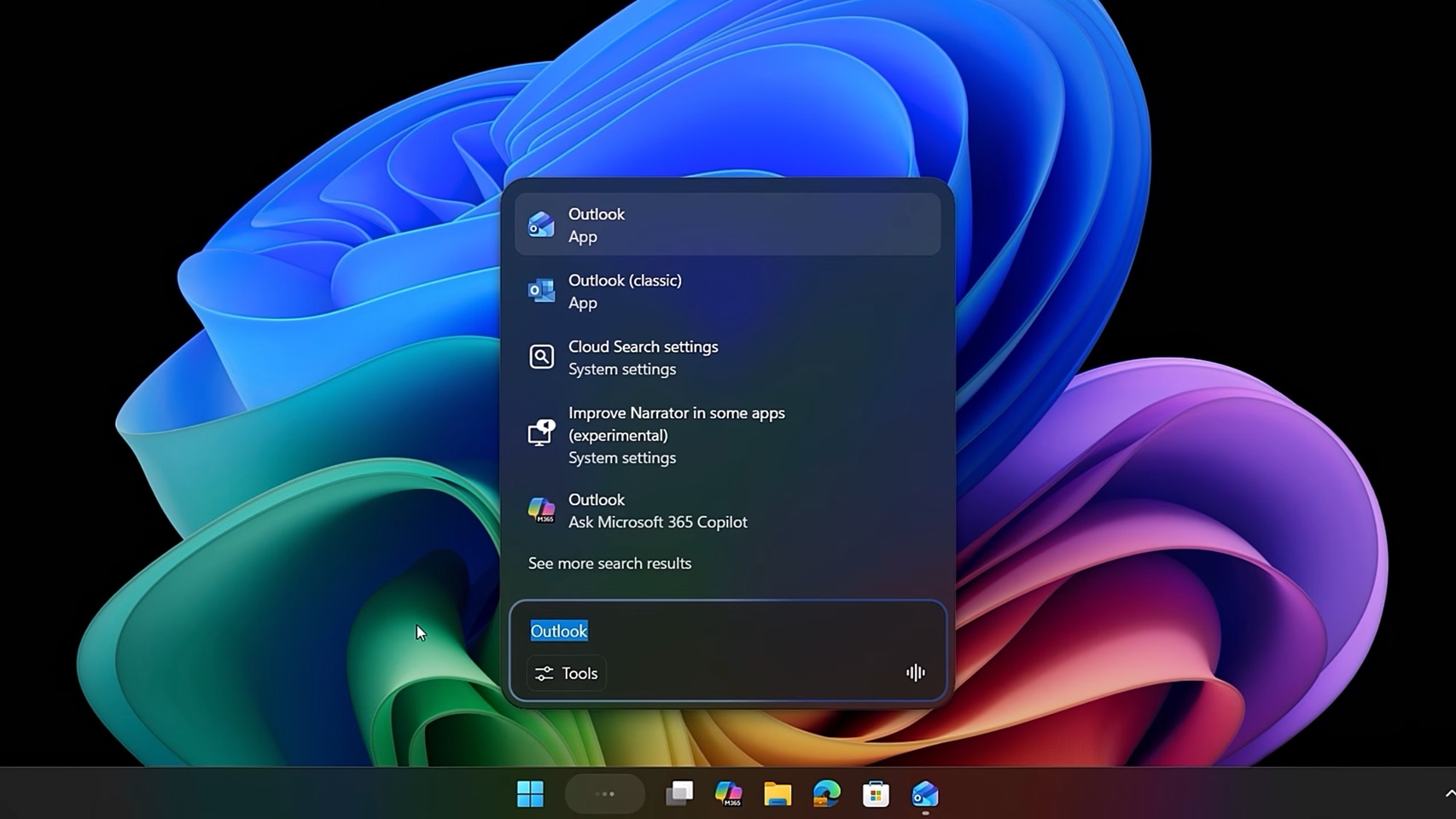
💡Windows 11 gets native Copilot in taskbar/File Explorer—test for daily AI productivity gains
⚡ 30 秒速覽
有什麼變化
Windows 11 工作列新增「Ask Copilot」按鈕,提供快速 AI 存取
為什麼重要
這加深了 Copilot 與作業系統的整合,使 AI 輔助無所不在,有助提升 Windows 使用者尤其是企業環境的採用率。開發者可利用其實現無縫 AI 強化工作流程。
下一步行動
Update to latest Windows 11 Insider build and enable Copilot in Settings to test taskbar integration.
關鍵要點
- •Windows 11 工作列新增「Ask Copilot」按鈕,提供快速 AI 存取
- •Microsoft 365 Copilot 直接整合至檔案總管
- •功能將於未來數週推送給所有 Windows 11 用戶
- •強調不改變使用者工作流程,提升生產力
🧠 深度解析
背景與延伸:來自公開資料,非原文內容。引用 6 個來源。
🔑 增強重點摘要
- •Microsoft 365 Copilot now supports right-click file and folder summaries in File Explorer, enabling AI-powered previews and analysis directly from the file system[3]
- •Microsoft has deployed Microsoft 365 Copilot to over 300,000 employees and external staff, demonstrating enterprise-scale implementation with phased rollout strategies[5]
- •Copilot connectors extend functionality beyond Microsoft 365 to over 100 prebuilt integrations including Miro, Dropbox, Google Drive, ServiceNow, and Freshservice for cross-platform data access[1][2]
- •Data governance and sensitivity labeling are critical to Copilot deployment, with Microsoft using Microsoft Purview to enforce default 'Confidential\Internal Only' labels and prevent oversharing[4][5]
- •The taskbar integration represents Microsoft's strategy to embed Copilot into core Windows workflows, reducing friction for users to access AI assistance without changing established habits[3]
📊 競品分析▸ Show
| Feature | Microsoft 365 Copilot | Competitor Context |
|---|---|---|
| File System Integration | Native File Explorer right-click access with AI summaries | Limited direct OS-level integration in competing solutions |
| Cross-Platform Connectors | 100+ prebuilt connectors (Miro, Dropbox, Google Drive, ServiceNow) | Varies by competitor; some require custom API development |
| Enterprise Deployment Scale | 300,000+ users at Microsoft with phased rollout | Comparable enterprise solutions exist but deployment scale varies |
| Data Governance | Sensitivity labeling, Microsoft Purview integration, RMS protections | Enterprise competitors offer similar DLP capabilities |
| Taskbar Access | Quick 'Ask Copilot' entry point in Windows 11 | Competitors typically require separate application launch |
🛠️ 技術深入
• Copilot Connectors Architecture: Microsoft 365 Copilot uses two connector types—synced connectors that index external data into Microsoft tenant databases, and federated connectors that connect to data in real time[2] • File Explorer Integration: Right-click context menu triggers AI-powered summaries and previews, leveraging Copilot's ability to analyze file content and metadata[3] • Data Access Control: Copilot respects sensitivity labels, permissions, and Rights Management Service (RMS) protections; file labels are reflected in chat responses to maintain confidentiality awareness[5] • Identity Mapping: Data source identities are mapped using Microsoft Entra IDs, enabling permission-based access control where only users with source access can view indexed content[6] • Governance Implementation: Microsoft uses Microsoft Graph Data Connect for oversharing detection and Microsoft Purview for lifecycle management, attestation protocols, and DLP standards configuration[4] • Connector Capabilities: Indexed data includes metadata properties (creation date, owners, labels, status) with customizable crawl frequencies; some connectors have limitations (e.g., Shortcut Story connector only indexes two-year-old stories)[6]
🔮 前景展望基於引用來源的 AI 分析
Microsoft's integration of Copilot into Windows 11's core UI (taskbar and File Explorer) signals a strategic shift toward making AI assistance ambient and always-accessible rather than application-specific. This approach aims to reduce adoption friction and establish Copilot as the default productivity layer across enterprise workflows. The expansion of 100+ connectors indicates Microsoft is positioning Copilot as a unified data access layer that abstracts complexity across disparate enterprise systems (ServiceNow, Salesforce, Google Workspace, etc.), potentially commoditizing traditional enterprise search and knowledge management tools. The emphasis on data governance and sensitivity labeling suggests Microsoft anticipates regulatory scrutiny around AI data access in regulated industries. Competitors will likely accelerate similar OS-level integrations and connector ecosystems to maintain parity. The phased deployment model Microsoft used internally (300,000+ employees) may become an industry standard for large-scale AI adoption, emphasizing change management and governance over rapid rollout.
⏳ 時間線
📎 來源 (6)
Factual claims are grounded in the sources below. Forward-looking analysis is AI-generated interpretation.
- learn.microsoft.com — Release Notes
- learn.microsoft.com — Connectors Gallery
- communityjournal.net — Microsoft Not Reading the Room As It Doubles Down by Integrating Copilot Even More
- Microsoft — Deploying Microsoft 365 Copilot in Five Chapters
- Microsoft — Microsoft 365 Copilot for Executives Sharing Our Deployment and Adoption Journey at Microsoft
- learn.microsoft.com — Shortcut Story Overview
AI 週報
閱讀本週精選 AI 大事摘要 →
👉相關動態
AI 策展新聞聚合。所有內容版權歸原始發布者所有。
原始來源: cnBeta (Full RSS) ↗
每週電子報
每週一封,可隨時退訂。