Microsoft retracts claim that Defender is sufficient for users
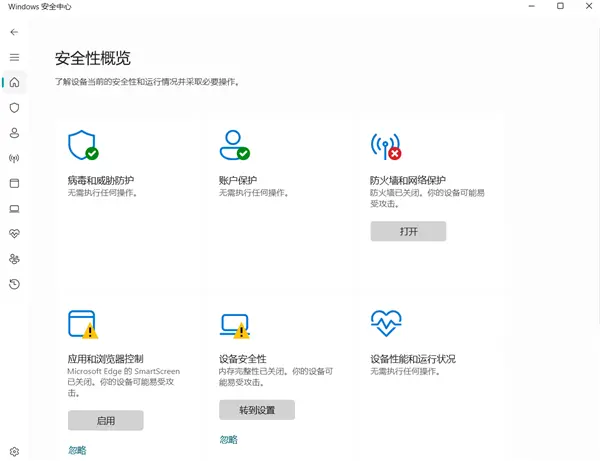
💡Microsoft's subtle policy shift on Defender could signal new security requirements for Windows environments.
⚡ 30-Second TL;DR
What Changed
Microsoft deleted a blog post from April regarding Defender's sufficiency.
Why It Matters
This change may lead to increased scrutiny of built-in OS security and potentially open doors for third-party security vendors to re-enter the Windows ecosystem more aggressively.
What To Do Next
Review your enterprise security stack to ensure multi-layered protection beyond default OS tools.
Key Points
- •Microsoft deleted a blog post from April regarding Defender's sufficiency.
- •The original post claimed third-party antivirus was unnecessary for Windows 11 users.
- •The removal indicates a potential shift in Microsoft's security marketing strategy.
🧠 Deep Insight
Background and context from public sources — not the original article. 25 sources cited.
🔑 Enhanced Key Takeaways
- •The deleted blog post, titled "Best antivirus software for 2026: The built-in Windows protection you need," was originally published in April 2026 in the Windows Learning Center and explicitly stated that most Windows 11 users no longer needed third-party antivirus software.
- •Microsoft's original claim highlighted that Windows 11's built-in security stack, including Microsoft Defender Antivirus, SmartScreen, Smart App Control, ransomware mitigation, and cloud-delivered protection, formed a sufficient baseline for common attack paths.
- •The retraction was first noted by AV-Comparatives on May 26, 2026, which described the removal as a "constructive step" towards more realistic security guidance, contrasting it with a more measured article Microsoft published on January 13, 2026, titled "Trusted antivirus protection for PCs."
- •The removal of the blog post occurred shortly after multiple zero-day vulnerabilities affecting Microsoft Defender Antivirus were publicly disclosed and actively exploited in April 2026, including flaws dubbed BlueHammer, RedSun, and UnDefend.
- •Microsoft Defender's effectiveness relies heavily on cloud-assisted intelligence, reputation systems, telemetry analysis, and cloud-based threat detection, which explains its strong online protection results but comparatively lower offline detection rates in some independent tests.
📊 Competitor Analysis▸ Show
Antivirus Software Comparison (2026)
| Feature/Category | Microsoft Defender (Built-in) | Bitdefender | Norton 360 | TotalAV |
|---|---|---|---|---|
| Pricing Model | Free (built into Windows) | Subscription-based (e.g., $60 first year, $110 renewal for Total Security) | Subscription-based (e.g., $30-$300 first year, $60-$365 renewal) | Subscription-based (e.g., $49 first year for Total Security) |
| Core Protection | Real-time protection, malware, virus, ransomware, phishing, SmartScreen, Smart App Control, cloud-delivered protection | Real-time threat detection, multi-layered ransomware protection, anti-phishing | Real-time protection, ransomware protection, AI agents, intelligent firewall | Real-time protection, malware, ransomware, web protection |
| Detection Rates (Lab Tests) | Often scores near top-tier products (e.g., 6.0/6.0 in AV-Test, 98.5-100% real-world in AV-Comparatives) | Excellent scores in independent lab tests, near-perfect detection rates | Perfect scores in independent lab tests, excellent in hands-on tests | Excellent malware detection and protection rates |
| Offline Detection | Lower offline detection rate (e.g., 89.2% in AV-Comparatives March 2026 test) | Generally strong, often higher than Defender | Generally strong, often higher than Defender | Not specifically detailed, but generally strong for paid AVs |
| System Impact | Minimal CPU usage during scans | Minimal system lag, lightweight | Good performance, but can be higher with full suites | Apps don't take up much space, minimal performance issues |
| Additional Features | Basic protection, no VPN, identity monitoring, or advanced parental controls | VPN (data limit on lower tiers), Safepay browser, Autopilot, data breach monitoring | VPN, password manager, cloud backups, dark web monitoring, parental controls, identity theft protection | VPN, password manager, system clean-up tool, data breach monitoring |
| Target User | Basic home users, those seeking free, built-in protection | Users wanting strong protection with less system drag | Families, users wanting an all-in-one security bundle | Users prioritizing simple interface and budget-friendly first year |
🛠️ Technical Deep Dive
- Evolution: Microsoft Defender evolved from a basic anti-spyware tool (Windows Defender, 2006, a rebrand of GIANT AntiSpyware acquired in 2004) into a full-fledged antivirus solution, replacing Microsoft Security Essentials in Windows 8.
- Core Components: Microsoft Defender Antivirus is part of the broader Windows Security suite and includes real-time protection, SmartScreen, Smart App Control, ransomware mitigation, and cloud-delivered protection.
- Cloud-Native Architecture: Microsoft Defender for Endpoint (MDE) operates with a cloud-native architecture where on-device Defender components act as sensors, collecting behavioral signals from the operating system. This data is sent to the Defender for Endpoint cloud service for analysis.
- Cloud Security Analytics: The cloud analytics layer leverages Microsoft's threat intelligence and big-data machine learning to identify threats, correlate signals across devices, and generate alerts.
- Threat Intelligence: Threat intelligence from third-party partners and Microsoft security teams contributes to identifying specific attacker techniques, procedures, and tools, creating alerts when these indicators are observed.
- Advanced Features (MDE): For enterprise-grade protection, MDE integrates capabilities such as Attack Surface Reduction (ASR), Next-Generation Antivirus, Endpoint Detection and Response (EDR), Threat and Vulnerability Management (TVM), automated investigation and remediation, and advanced hunting.
- Detection Methods: Modern Defender utilizes cloud-driven behavioral detection and machine learning, moving beyond older static signature scanning methods that were easily bypassed.
- Integration: Defender integrates seamlessly with the Microsoft ecosystem, including Microsoft 365 Defender XDR, Microsoft Defender for Identity (MDI), and Microsoft Defender for Cloud, to provide a unified view of security incidents.
🔮 Future ImplicationsAI analysis grounded in cited sources
⏳ Timeline
📎 Sources (25)
Factual claims are grounded in the sources below. Forward-looking analysis is AI-generated interpretation.
- windowslatest.com
- windowsforum.com
- xda-developers.com
- betanews.com
- fieldeffect.com
- secpod.com
- netizen.net
- medium.com
- cloudoptimo.com
- reviewed.com
- cnet.com
- security.org
- karlstechnology.com
- pcmag.com
- itcarolina.com
- cloudvanguard-it.com
- primetechinsights.com
- infinitygroup.co.uk
- wikipedia.org
- techrepublic.com
- secureazcloud.com
- bluevoyant.com
- cynet.com
- microsoft.com
- hexacorp.com
Weekly AI Recap
Read this week's curated digest of top AI events →
👉Related Updates
AI-curated news aggregator. All content rights belong to original publishers.
Original source: cnBeta (Full RSS) ↗
This is a summary, not the original. Read the source, or get the weekly briefing.
The weekly digest
One email a week. Unsubscribe anytime.