Google Chrome introduces 'Skills' to automate AI prompts
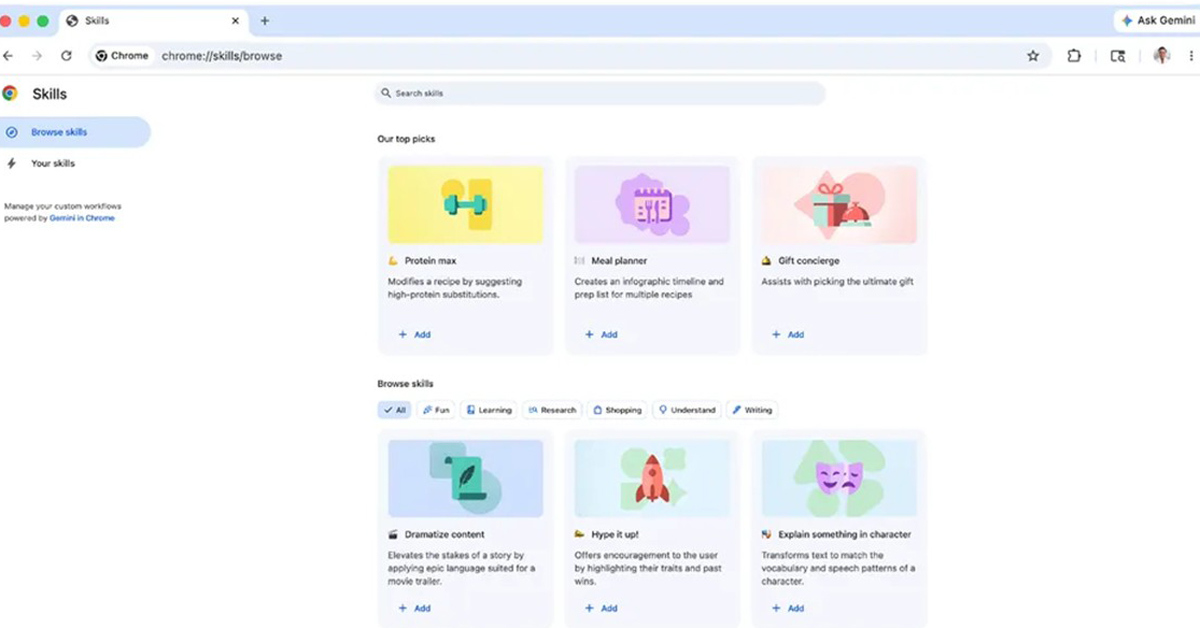
💡Learn how to optimize your AI workflow by saving and reusing prompts directly within Google Chrome.
⚡ 30-Second TL;DR
What Changed
Introduces 'Skills in Chrome' for saving frequently used AI prompts.
Why It Matters
This feature streamlines AI-assisted workflows for browser-based tasks, potentially increasing productivity for developers and power users who rely on LLMs for daily coding or research.
What To Do Next
Monitor the Chrome release notes to integrate your most frequent LLM prompt templates into 'Skills' for faster iteration.
Key Points
- •Introduces 'Skills in Chrome' for saving frequently used AI prompts.
- •Enables one-click execution of complex AI workflows within the browser.
- •Reduces manual overhead for power users interacting with AI models.
🧠 Deep Insight
Background and context from public sources — not the original article. 14 sources cited.
🔑 Enhanced Key Takeaways
- •The 'Skills' feature allows users to save customized AI prompts directly from their Gemini chat history, which can then be re-executed with a single click by typing '/' or clicking a '+' button in the Gemini side panel within Chrome.
- •Google has launched a pre-built 'Skills library' offering over 50 ready-to-use prompts for common tasks like summarizing YouTube videos, comparing products, or analyzing food ingredients, which users can either save as-is or customize.
- •These saved 'Skills' are capable of operating across multiple open tabs, enabling complex AI workflows such as consolidating information from various websites for travel planning or performing side-by-side product comparisons.
- •The 'Skills' feature is currently available to Chrome desktop users whose browser language is set to US English, and it does not require a paid subscription, making it accessible to regular Google account holders.
- •Google ensures that 'Skills' in Chrome maintain the same safety and privacy safeguards as other Gemini prompts, including requiring user confirmation before executing sensitive actions like sending an email.
📊 Competitor Analysis▸ Show
| Feature | Google Chrome 'Skills' | Perplexity Comet | ChatGPT Atlas | Microsoft Edge Copilot | Fellou |
|---|---|---|---|---|---|
| Core Function | Save and reuse specific AI prompts for one-click execution within Chrome's Gemini sidebar. | Automates multi-step tasks and web browsing with an AI assistant. | AI assistant with agent mode for task automation and content generation. | Built-in AI assistant (Copilot) for summarization, comparison, and content generation. | Agentic AI browser for automating complex web tasks with one prompt. |
| Workflow Automation | One-click execution of saved prompts; can operate across multiple tabs. | Autonomous agentic AI for multi-site tasks and pre-loading pages. | Agent mode for task automation; built-in memory for personalized experience. | Tab summarization and comparison tools. | Analyzes goals, creates step-by-step action plans, automates multi-source research. |
| Availability/Pricing | Free for Chrome desktop users (US English) with Gemini access. | Free. | Free tier with basic features; advanced tools require $20/month Plus plan. | Free, built into Edge browser. | Free for up to 4 tasks; Plus plan $20/month. |
| Privacy/Data Handling | Same safety and privacy safeguards as Gemini prompts; confirmation for sensitive tasks. | (Not explicitly detailed for prompt saving, but generally AI-native browsing) | Built-in memory for personalized experience. | Enterprise security features. | (Not explicitly detailed for prompt saving) |
🛠️ Technical Deep Dive
- 'Skills' are saved directly from a user's Gemini chat history within the Chrome browser.
- They are executed via the Gemini side panel in Chrome, triggered by typing a forward slash (/) or clicking a plus (+) button.
- The feature leverages the context of the current browser tab and can extend to reference content from up to 10 additional open tabs for multi-page workflows.
- Safety and privacy measures are integrated, mirroring those of Gemini prompts, including explicit user confirmation for actions deemed sensitive, such as sending emails.
- For AI-powered history search, which is a related Chrome AI feature, website content is stored locally and encrypted on the user's device.
- The broader Chrome AI ecosystem includes the integration of Gemini Nano into the desktop client, enhancing AI capabilities, including offline app development and content generation, potentially utilizing WebGPU and WebAssembly for improved in-browser performance.
🔮 Future ImplicationsAI analysis grounded in cited sources
⏳ Timeline
📎 Sources (14)
Factual claims are grounded in the sources below. Forward-looking analysis is AI-generated interpretation.
Weekly AI Recap
Read this week's curated digest of top AI events →
👉Related Updates
AI-curated news aggregator. All content rights belong to original publishers.
Original source: ITmedia AI+ (日本) ↗
This is a summary, not the original. Read the source, or get the weekly briefing.
The weekly digest
One email a week. Unsubscribe anytime.