Control Windows Codex apps remotely from your smartphone
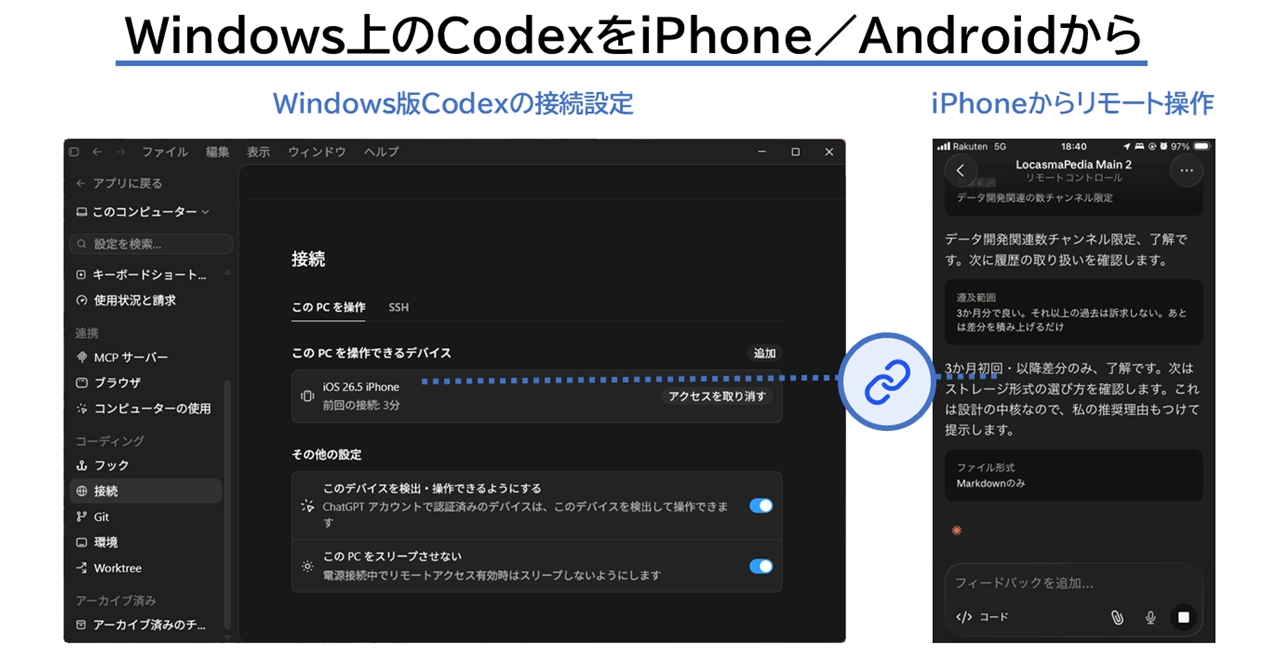
💡Learn how to maintain your AI coding momentum and manage Windows tasks remotely from your smartphone.
⚡ 30-Second TL;DR
What Changed
Remote monitoring of AI coding tasks on Windows via smartphone
Why It Matters
This update significantly lowers the friction for developers who rely on AI coding assistants, allowing for more flexible working environments. It enables real-time oversight of long-running coding processes without requiring physical presence.
What To Do Next
Install the latest version of the Codex app on your mobile device and link it to your Windows development environment to test remote task management.
Key Points
- •Remote monitoring of AI coding tasks on Windows via smartphone
- •Ability to send instructions to the Codex app while away from the workstation
- •Improved workflow continuity for developers using AI-assisted coding
🧠 Deep Insight
Background and context from public sources — not the original article. 24 sources cited.
🔑 Enhanced Key Takeaways
- •The remote control functionality allows developers to "start, review, and steer" AI coding tasks on their Windows systems directly from a smartphone, ensuring continuous workflow management even when away from the PC.
- •OpenAI's "Computer Use" feature, now available on Windows 11, enables the Codex AI to interact with applications using a virtual mouse and keyboard, facilitating tasks such as testing programs, updating databases, and troubleshooting workflows. This capability was previously exclusive to macOS.
- •The mobile app functions as a control interface rather than a full development environment, providing real-time access to screenshots, terminal output, code differences (diffs), and test results, and allowing users to approve or reject pending AI commands.
- •Remote connections to the Codex app on a Windows host are established using SSH, requiring the Codex app to be installed and authenticated on the remote machine.
- •While currently available across all Codex plans, including free tiers, the remote control feature is slated to become exclusive to major paid plans such as Plus, Pro, Business, and Enterprise in the future.
📊 Competitor Analysis▸ Show
Competitor Analysis: AI-Assisted Coding Tools with Remote Capabilities
| Feature / Product | OpenAI Codex | GitHub Copilot | Claude Code | Amazon Q Developer |
|---|---|---|---|---|
| Core Function | Autonomous coding agent, desktop app, remote control via mobile | AI pair programmer, real-time code suggestions, chat | Large codebase reasoning, agentic workflows, remote control | Structured assistance, AWS workflow integration |
| Remote Control | Yes (via ChatGPT mobile app for Windows/macOS hosts, including virtual mouse/keyboard control) | Limited/None (primarily IDE-integrated) | Yes (via Claude CoWork's Dispatch, per-session activation) | Limited/None (focused on IDE/AWS integration) |
| Platform Support | Windows, macOS, CLI, IDE extensions, ChatGPT web/mobile | Multiple IDEs (e.g., VS Code, JetBrains) | Web, IDE integrations | AWS environments, IDE integrations |
| Pricing Model | Included with ChatGPT Plus ($20/month) and Pro ($200/month); API pricing varies | $10/month (individual), Business/Enterprise tiers available | Usage-based through Anthropic plans (Max plan starts at $100/month for individual) | Included with AWS services, specific tiers for advanced features |
| Key Differentiator | Agentic reboot in 2025, "Computer Use" for GUI interaction, persistent host-level mobile pairing | Deep IDE integration, wide adoption, strong code completion | Strong reasoning for complex tasks, handles large codebases | AWS ecosystem integration, security compliance |
| Security Features | OS-enforced sandbox, approval policies, remote control off by default, SSO/MFA for enterprise | Security scanning integration | Scans repositories for vulnerabilities | AWS security compliance |
🛠️ Technical Deep Dive
- Remote Connection Protocol: Remote access to the Codex app server is established and managed using SSH (Secure Shell).
- Host-Side Requirements: The Codex app must be installed and authenticated on the remote Windows host. The
codexcommand needs to be available in the remote user's login shell's PATH. - Virtual Interaction: The "Computer Use" feature on Windows 11 allows Codex to control applications by simulating virtual mouse and keyboard inputs to navigate the system and perform tasks.
- Sandbox Environments: Codex can operate on Windows either natively with an elevated or fallback unelevated sandbox, or within the Windows Subsystem for Linux 2 (WSL2) for Linux-native tooling. The sandbox enforces OS-level mechanisms to limit access, typically to the current workspace.
- Model Architecture: Codex runs on the GPT family of models, including coding-specialized variants like the GPT-5-Codex series. The default model for most tasks is
gpt-5.5, offering strong planning and tool use. - Mobile App Integration: The ChatGPT mobile app acts as a remote control interface, loading the live state from the connected desktop environment, including active threads, approvals, plugins, and project context. It receives real-time updates such as screenshots, terminal output, and test results.
- Security Measures: Remote control is disabled by default and requires explicit enablement by an administrator or owner, often involving multi-factor authentication (MFA) and Single Sign-On (SSO) for enterprise workspaces.
🔮 Future ImplicationsAI analysis grounded in cited sources
⏳ Timeline
📎 Sources (24)
Factual claims are grounded in the sources below. Forward-looking analysis is AI-generated interpretation.
Weekly AI Recap
Read this week's curated digest of top AI events →
👉Related Updates

AI-curated news aggregator. All content rights belong to original publishers.
Original source: ITmedia AI+ (日本) ↗
This is a summary, not the original. Read the source, or get the weekly briefing.
The weekly digest
One email a week. Unsubscribe anytime.