ChatGPT Gains Mac Message Control
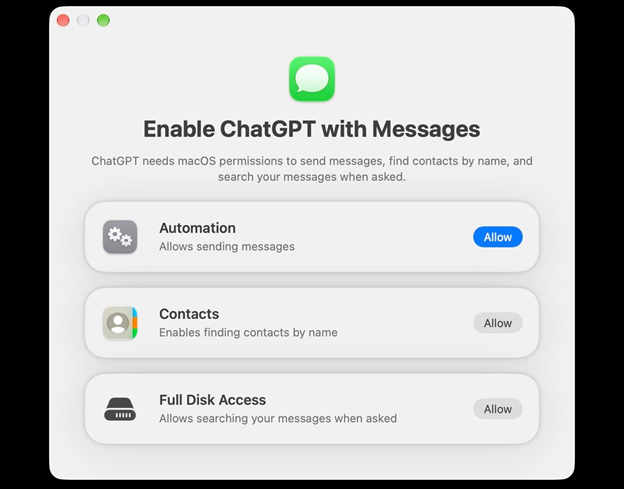
💡A ChatGPT plugin can now read and send Mac messages—revealing the security risks of AI agents using native permissions.
⚡ 30-Second TL;DR
What Changed
The plugin is available in ChatGPT Work and Codex on Apple Silicon Macs, but not in regular chat, the web, mobile, or Intel Macs.
Why It Matters
The feature demonstrates how macOS’s legacy automation and accessibility permissions can give AI agents broad control over sensitive user data. Developers building computer-use agents should treat permission scope, confirmation flows, and scheduled actions as core security boundaries.
What To Do Next
Audit any macOS AI agent’s Full Disk Access and Automation permissions, and require per-message confirmation by default instead of enabling persistent authorization.
Key Points
- •The plugin is available in ChatGPT Work and Codex on Apple Silicon Macs, but not in regular chat, the web, mobile, or Intel Macs.
- •It can search message history, summarize conversations, draft contact-specific replies, identify spam, extract birthdays, and send messages.
- •Users must grant Full Disk Access, Contacts, and Automation permissions; persistent authorization and scheduled tasks may allow messages to be sent without per-message confirmation.
- •The plugin was developed by Ari Weinstein’s team, whose members previously created Workflow and helped build Apple Shortcuts.
🧠 Deep Insight
Background and context from public sources — not the original article. 11 sources cited.
🔑 Enhanced Key Takeaways
- •OpenAI claims the plugin utilizes local processing on the macOS device, ensuring that message indexing does not occur on OpenAI's cloud servers.
- •The integration is currently at the center of ongoing litigation, with Apple suing OpenAI over alleged trade secret theft and intellectual property misappropriation.
- •The plugin is strictly opt-in, requiring users to manually install it via the ChatGPT Plugins interface and navigate multiple system-level permission prompts.
- •While default settings mandate explicit user approval for every outgoing message, the configuration allows for persistent authorization settings that could bypass per-message confirmation.
- •The plugin's capability extends beyond iMessage to include SMS and RCS protocols, provided they are synced to the macOS Messages application.
🛠️ Technical Deep Dive
- The plugin architecture relies on macOS Automation and Apple Events to interface with the Messages application database.
- Full Disk Access is required to bypass macOS sandbox restrictions, allowing the plugin to read the local SQLite databases where iMessage/SMS/RCS history is stored.
- The system utilizes local inference or local-first processing logic to parse message threads without transmitting raw message history to OpenAI's cloud infrastructure.
- Integration is restricted to Apple Silicon (M-series) chips, likely leveraging the Neural Engine for local summarization and intent recognition tasks.
🔮 Future ImplicationsAI analysis grounded in cited sources
⏳ Timeline
📎 Sources (11)
Factual claims are grounded in the sources below. Forward-looking analysis is AI-generated interpretation.
Weekly AI Recap
Read this week's curated digest of top AI events →
👉Related Updates

AI-curated news aggregator. All content rights belong to original publishers.
Original source: 虎嗅 ↗
This is a summary, not the original. Read the source, or get the weekly briefing.
Weekly AI briefing
One email a week. Unsubscribe anytime.