Building interactive AI workspaces with GitHub Canvases
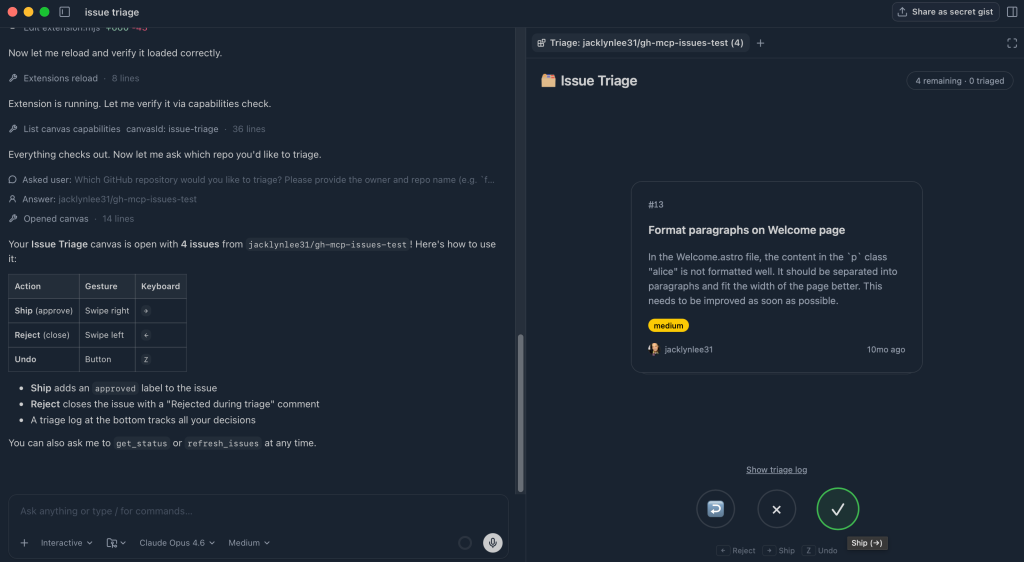
💡Learn how to move beyond simple chat and build persistent, interactive AI workspaces for complex coding tasks.
⚡ 30-Second TL;DR
What Changed
Canvases turn static AI chat into persistent, interactive workspaces.
Why It Matters
This feature shifts the paradigm from simple chat interfaces to collaborative workspaces, potentially increasing developer productivity by keeping context and execution in one place.
What To Do Next
Explore the Canvases documentation to integrate your custom AI workflows into a persistent workspace for better project management.
Key Points
- •Canvases turn static AI chat into persistent, interactive workspaces.
- •Enables visualization of complex information and project workflows.
- •Supports direct action-taking on tasks within the AI-powered environment.
🧠 Deep Insight
AI-generated analysis for this event — not the original article.
🔑 Enhanced Key Takeaways
- •GitHub Canvases integrate directly with the GitHub Copilot ecosystem, allowing the workspace to maintain context across multiple repositories and issues simultaneously.
- •The feature utilizes a multi-modal rendering engine that supports real-time code execution, diagramming, and document editing within the same persistent view.
- •Canvases are designed to be collaborative, enabling multiple developers to interact with the same AI-generated workspace in real-time, similar to collaborative document editing.
- •The architecture leverages GitHub's existing 'Copilot Extensions' framework, allowing third-party tools to inject data and interactive widgets directly into the Canvas interface.
- •GitHub has implemented a state-persistence layer that saves the 'contextual snapshot' of a Canvas, allowing users to resume complex AI-driven workflows exactly where they left off.
📊 Competitor Analysis▸ Show
| Feature | GitHub Canvases | Cursor Composer | Replit Agent |
|---|---|---|---|
| Primary Focus | Persistent IDE-integrated workflows | AI-driven multi-file editing | Cloud-based app deployment |
| Collaboration | Native real-time multi-user | Limited/Beta | Native multi-user |
| Pricing | Included in Copilot Enterprise | Subscription-based | Tiered/Usage-based |
🛠️ Technical Deep Dive
- Built on a custom React-based rendering layer that synchronizes state between the AI model's output and the IDE's file system.
- Utilizes a WebSocket-based synchronization protocol to handle concurrent edits from multiple users and the AI agent.
- Implements a sandboxed execution environment for widgets, ensuring that interactive components do not compromise repository security.
- Integrates with the GitHub API to automatically map Canvas elements to specific issues, pull requests, or code blocks for traceability.
🔮 Future ImplicationsAI analysis grounded in cited sources
⏳ Timeline
Weekly AI Recap
Read this week's curated digest of top AI events →
👉Related Updates
AI-curated news aggregator. All content rights belong to original publishers.
Original source: GitHub Blog ↗
This is a summary, not the original. Read the source, or get the weekly briefing.
The weekly digest
One email a week. Unsubscribe anytime.