Windows 11 Setup Now Skips Forced Updates
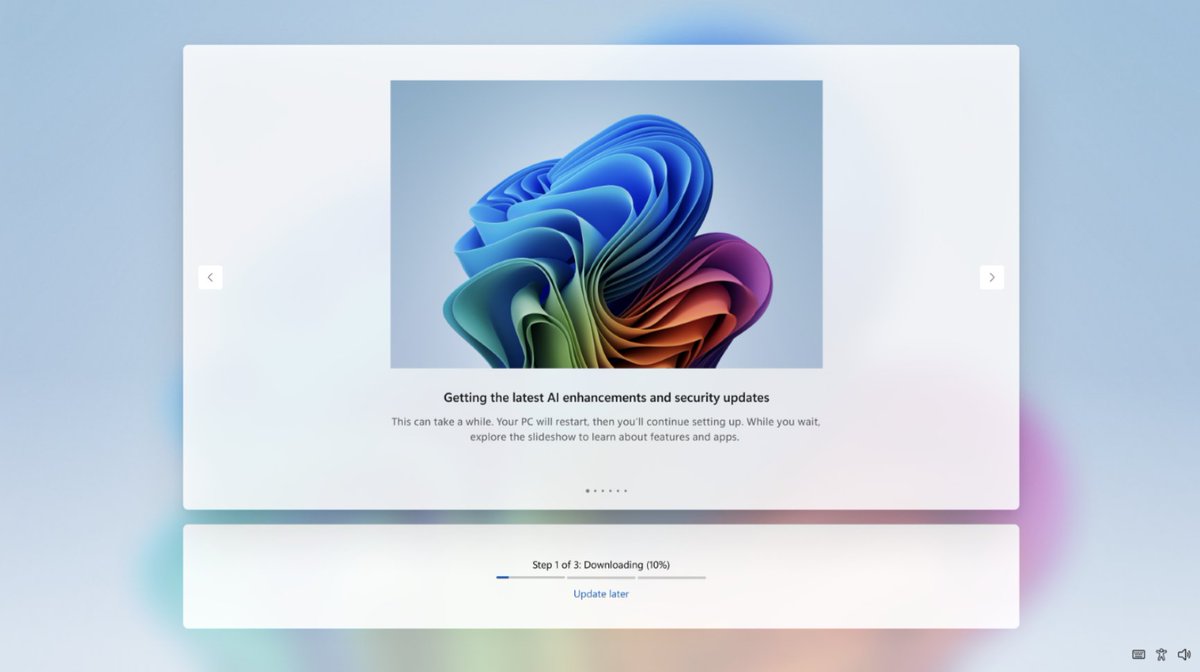
💡Win11 skips setup updates—dev rigs ready in minutes, not hours
⚡ 30-Second TL;DR
What Changed
'Update later' option added to Windows 11 OOBE
Why It Matters
Accelerates new device onboarding, helping developers quickly set up workstations without update delays.
What To Do Next
Run a fresh Windows 11 install to test 'Update later' and speed up your dev machine setup.
Key Points
- •'Update later' option added to Windows 11 OOBE
- •Skips forced updates during first-time setup
- •Speeds up access to desktop on new devices
- •Makes initial setup more user-friendly
🧠 Deep Insight
AI-generated analysis for this event — not the original article.
🔑 Enhanced Key Takeaways
- •The change addresses long-standing user complaints regarding the 'forced' nature of the Out-of-Box Experience (OOBE), which previously required an active internet connection and mandatory update downloads before reaching the desktop.
- •This modification is part of a broader shift in Microsoft's Windows 11 deployment strategy, aiming to reduce 'time-to-desktop' metrics for enterprise and consumer hardware partners who previously faced bottlenecks during mass device provisioning.
- •While the update can be skipped, Microsoft maintains telemetry hooks that may prompt users to complete these updates via Windows Update immediately upon reaching the desktop to ensure security compliance.
🛠️ Technical Deep Dive
• The OOBE process is managed by the 'oobenetworkconnectionflow.exe' and associated XML configuration files within the Windows image. • The 'Update later' option modifies the OOBE state machine, allowing the setup process to bypass the 'CheckForUpdates' task sequence in the Windows Setup engine. • This implementation relies on a conditional flag in the Windows registry (HKLM\SOFTWARE\Microsoft\Windows\CurrentVersion\OOBE) that dictates whether the network-dependent update check is mandatory or optional.
🔮 Future ImplicationsAI analysis grounded in cited sources
⏳ Timeline
Weekly AI Recap
Read this week's curated digest of top AI events →
👉Related Updates

AI-curated news aggregator. All content rights belong to original publishers.
Original source: cnBeta (Full RSS) ↗
This is a summary, not the original. Read the source, or get the weekly briefing.
Weekly AI briefing
One email a week. Unsubscribe anytime.