🇨🇳cnBeta (Full RSS)•Freshcollected in 1m
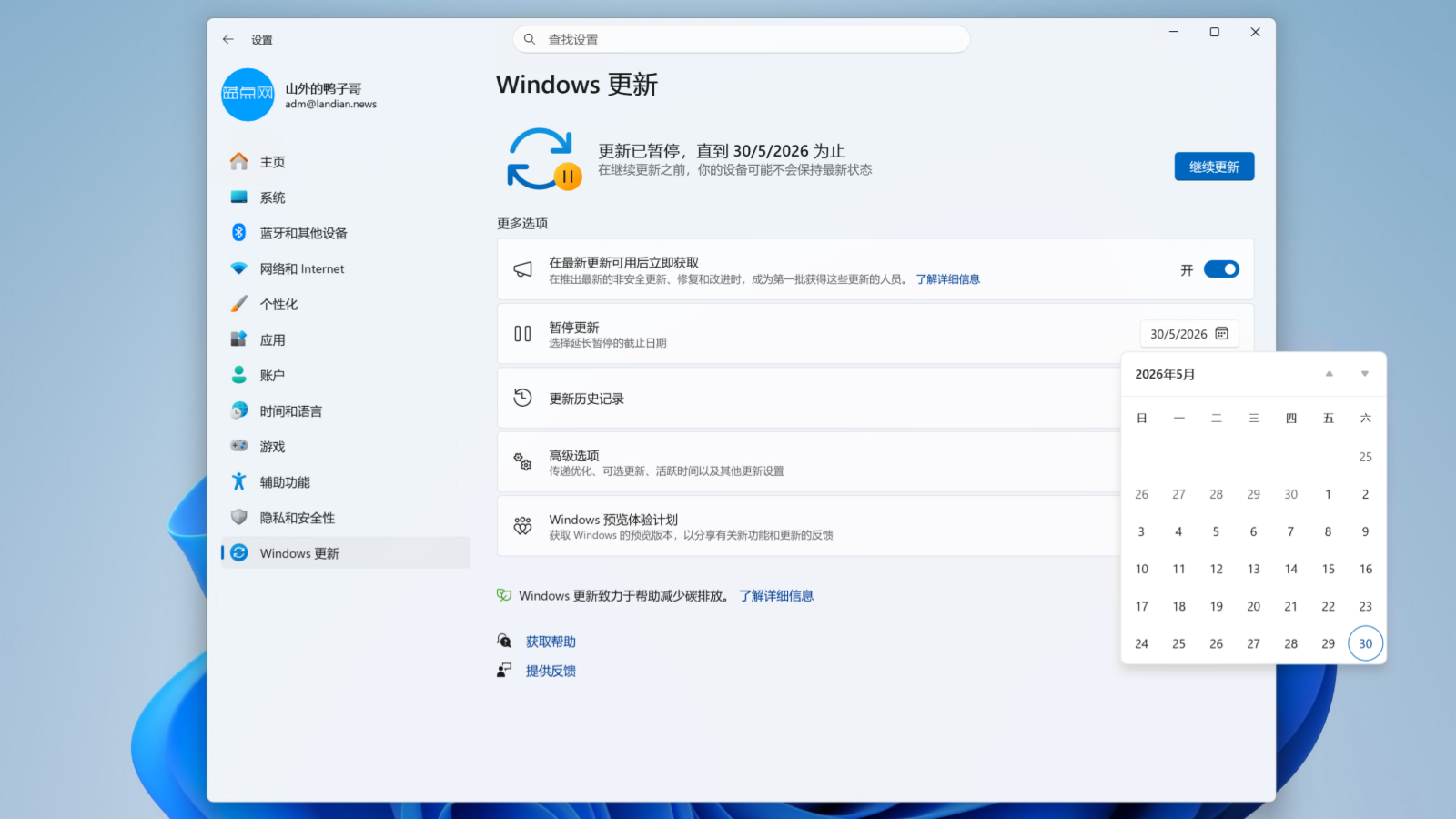
Windows 11 allows indefinite update pausing via 35-day cycles
💡Prevents forced Windows reboots that can crash long-running AI training jobs on local workstations.
⚡ 30-Second TL;DR
What Changed
Users can pause Windows 11 updates for up to 35 days at a time
Why It Matters
This update is highly beneficial for AI researchers and developers running long-duration training jobs on Windows workstations, as it prevents unexpected system reboots.
What To Do Next
Configure your Windows 11 update settings to the 35-day pause cycle if you are running long-running local model training to avoid forced interruptions.
Who should care:Developers & AI Engineers
Key Points
- •Users can pause Windows 11 updates for up to 35 days at a time
- •The pause can be extended indefinitely by resetting the setting every 35 days
- •This prevents forced system reboots during long-running AI training tasks
🧠 Deep Insight
AI-generated analysis for this event.
🔑 Enhanced Key Takeaways
- •The 35-day pause limit is a long-standing feature in Windows 10 and 11, originally designed to give enterprise administrators and power users control over deployment schedules.
- •Microsoft's update policy mandates that even with manual pausing, devices must eventually install critical security updates to remain compliant with Windows Update for Business policies.
- •The Windows Update service uses the 'PauseUpdatesStartTime' and 'PauseFeatureUpdatesStartTime' registry keys to track the expiration of the 35-day window.
- •Group Policy Objects (GPO) and Mobile Device Management (MDM) solutions can override manual user settings, allowing IT administrators to prevent users from indefinitely pausing updates in corporate environments.
- •While the pause feature delays OS updates, it does not necessarily block definition updates for Microsoft Defender, which often continue to download to maintain baseline security.
📊 Competitor Analysis▸ Show
| Feature | Windows 11 (Update Pause) | macOS (Software Update) | Linux (Distro-specific) |
|---|---|---|---|
| Pause Mechanism | Manual 35-day cycle | Deferral profiles (MDM only) | Manual control (User-defined) |
| Indefinite Delay | Possible via manual reset | Not natively supported for users | Fully supported by design |
| Forced Reboots | Yes (unless paused) | Yes (post-installation) | Rarely (kernel updates only) |
🛠️ Technical Deep Dive
- The pause functionality is governed by the Windows Update Agent (WUA) API, which checks the registry key HKEY_LOCAL_MACHINE\SOFTWARE\Microsoft\WindowsUpdate\UX\Settings.
- Setting the PauseFeatureUpdatesStartTime and PauseQualityUpdatesStartTime values allows the OS to calculate the remaining duration against the current system time.
- The Windows Update Orchestrator (USO) service manages the scheduling of these updates and respects the pause flags set by the user or administrator.
- When the 35-day limit is reached, the Windows Update service automatically clears the pause flags and forces a check for pending updates to ensure system security.
🔮 Future ImplicationsAI analysis grounded in cited sources
Microsoft will likely introduce more granular 'AI-aware' update scheduling.
As local AI workloads become more common, Microsoft will need to implement APIs that allow applications to signal when they are performing intensive tasks to prevent update-related interruptions.
Enterprise management tools will increasingly restrict manual pause capabilities.
To combat the rising threat of unpatched vulnerabilities, organizations will likely enforce stricter update policies that disable the manual 35-day pause feature via MDM.
⏳ Timeline
2015-07
Windows 10 launch introduces 'Defer Upgrades' for Pro and Enterprise editions.
2017-04
Windows 10 Creators Update adds the ability to pause updates for up to 35 days.
2021-10
Windows 11 launches, maintaining the 35-day update pause architecture.
2024-05
Microsoft updates Windows 11 update policies to better integrate with AI-driven background processes.
📰
Weekly AI Recap
Read this week's curated digest of top AI events →
👉Related Updates

AI-curated news aggregator. All content rights belong to original publishers.
Original source: cnBeta (Full RSS) ↗