WhatsApp Web Adds Calling and Enhanced Audio Features
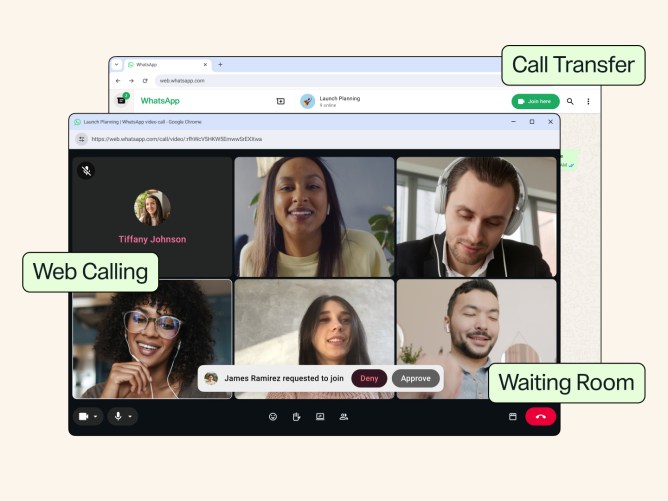
See how Meta is leveraging browser-based WebRTC to bring enterprise-grade audio features to the web.
30-Second TL;DR
What Changed
Native calling support enabled directly within the WhatsApp Web interface
Why It Matters
The integration of noise suppression and call management tools suggests Meta is positioning WhatsApp Web as a more viable alternative to dedicated enterprise communication platforms.
What To Do Next
If you are building communication tools, evaluate the WebRTC implementation in WhatsApp Web to understand how to optimize real-time audio processing in browser-based apps.
Key Points
- •Native calling support enabled directly within the WhatsApp Web interface
- •Implementation of background noise suppression for clearer audio quality
- •New call transfer functionality for seamless device switching
- •Expansion of desktop-based communication features
Deep Insight
AI-generated analysis for this event — not the original article.
Enhanced Key Takeaways
- •The update leverages WebRTC (Web Real-Time Communication) protocols to facilitate peer-to-peer encrypted audio and video streams directly through the browser without requiring additional plugins.
- •Meta has integrated these features into the WhatsApp Web architecture to reduce dependency on the mobile device's active connection, allowing for independent desktop calling sessions.
- •The background noise suppression utilizes a lightweight machine learning model optimized for client-side execution to minimize latency during live calls.
- •Call transfer functionality is powered by a synchronized session state across Meta's servers, enabling the handoff of active calls between mobile and desktop clients without dropping the connection.
- •This rollout includes enhanced end-to-end encryption (E2EE) protocols specifically adapted for multi-device desktop sessions, ensuring that call metadata remains private.
Competitor Analysis
- WhatsApp Web
- Yes
- Zoom Desktop
- Yes
- Microsoft Teams
- Yes
- WhatsApp Web
- AI-Based
- Zoom Desktop
- AI-Based
- Microsoft Teams
- AI-Based
- WhatsApp Web
- Yes
- Zoom Desktop
- Yes
- Microsoft Teams
- Yes
- WhatsApp Web
- Free
- Zoom Desktop
- Freemium
- Microsoft Teams
- Freemium/Enterprise
| Feature | WhatsApp Web | Zoom Desktop | Microsoft Teams |
|---|---|---|---|
| Native Browser Calling | Yes | Yes | Yes |
| Background Noise Suppression | AI-Based | AI-Based | AI-Based |
| Call Transfer (Device Handoff) | Yes | Yes | Yes |
| Pricing | Free | Freemium | Freemium/Enterprise |
Technical Deep Dive
- Utilizes WebRTC for real-time media transport, ensuring low-latency communication.
- Implements DTLS (Datagram Transport Layer Security) for securing media streams between endpoints.
- Employs Opus audio codec for high-fidelity voice transmission and adaptive bitrate control.
- Uses client-side WebAssembly (Wasm) modules to execute noise suppression algorithms efficiently within the browser sandbox.
- Maintains session persistence via a WebSocket connection to Meta's signaling servers for call initiation and state management.
Future ImplicationsAI analysis grounded in cited sources
Timeline
- 2015-01WhatsApp Web launches as a browser-based extension of the mobile app.
- 2021-03WhatsApp introduces voice and video calling to the desktop application.
- 2021-07Meta begins testing multi-device support, allowing WhatsApp to function without a phone connection.
- 2023-03WhatsApp releases a native Windows app with improved performance and calling capabilities.
- 2026-07Native calling and advanced audio features are deployed to the WhatsApp Web interface.
Weekly AI Recap
Read this week's curated digest of top AI events →
Related Updates

AI-curated news aggregator. All content rights belong to original publishers.
Original source: Meta Newsroom ↗
This is a summary, not the original. Read the source, or get the weekly briefing.
The weekly digest
One email a week. Unsubscribe anytime.