New UI for Generative AI Inference Recommendations in SageMaker
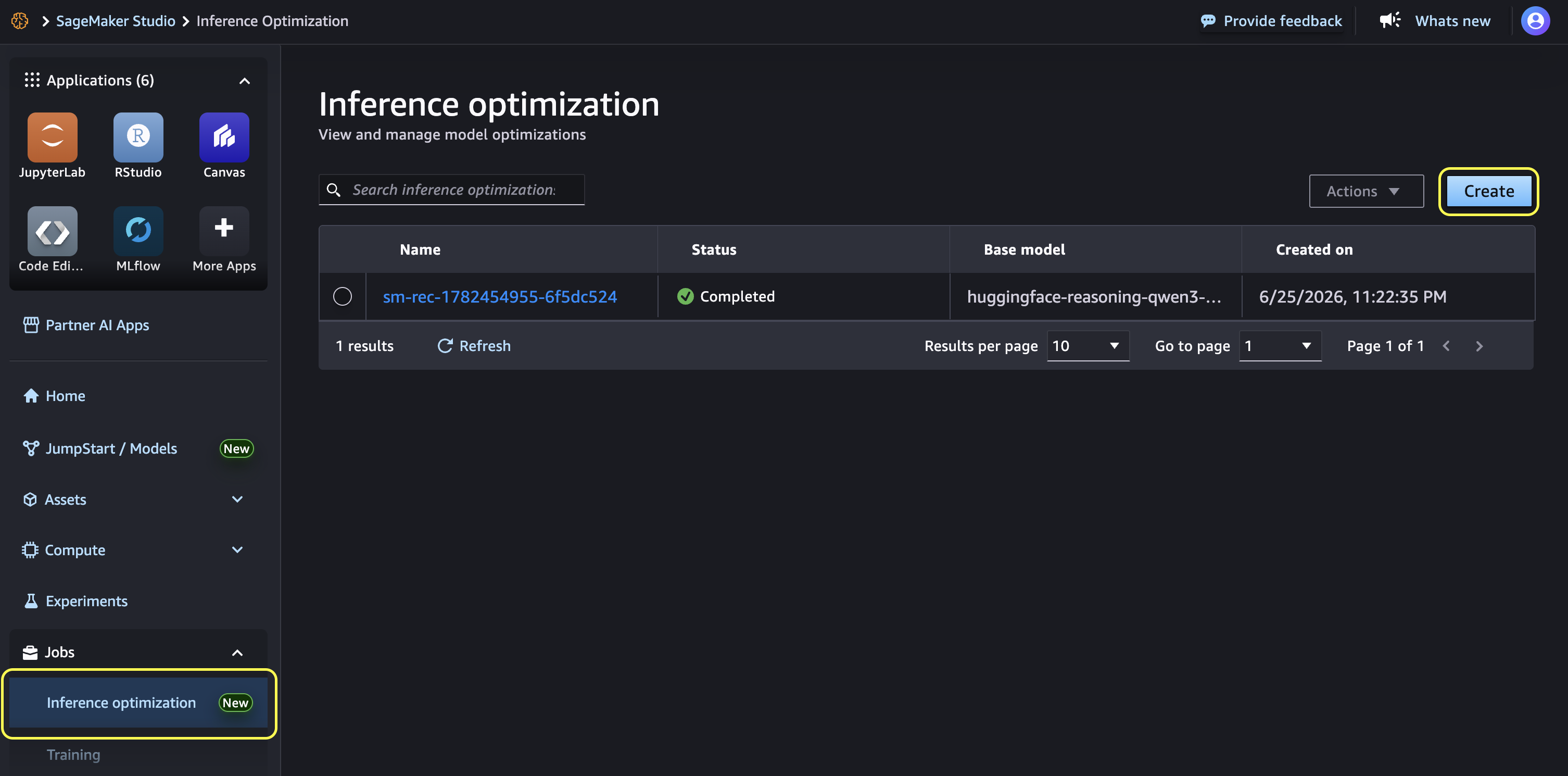
💡Simplify your LLM deployment: use the new SageMaker UI to get optimized inference configurations without manual tuning.
⚡ 30-Second TL;DR
What Changed
Introduces a low-code/no-code UI for generative AI inference recommendations.
Why It Matters
This update accelerates the deployment lifecycle for generative AI applications by reducing the time spent on infrastructure benchmarking and configuration. It empowers non-specialist teams to optimize model performance independently.
What To Do Next
Log into SageMaker AI Studio and test the new UI with your current model to see if it suggests a more cost-effective instance type.
Key Points
- •Introduces a low-code/no-code UI for generative AI inference recommendations.
- •Provides preset use-case profiles to eliminate manual parameter tuning.
- •Enables visual comparison of benchmark results and one-click deployment.
- •Lowers the barrier for teams without deep infrastructure expertise.
🧠 Deep Insight
AI-generated analysis for this event — not the original article.
🔑 Enhanced Key Takeaways
- •The new UI integrates directly with SageMaker Inference Recommender, which leverages historical performance data from thousands of previous model deployments to generate accurate predictions.
- •It supports automated selection of instance types across both AWS-designed silicon (Inferentia/Trainium) and NVIDIA GPU families, optimizing for price-performance ratios.
- •The tool automatically calculates 'cost-per-token' metrics, allowing users to forecast operational expenses before committing to a specific deployment configuration.
- •It includes native support for common generative AI frameworks and model formats, such as Hugging Face Transformers and PyTorch, ensuring compatibility with standard model artifacts.
- •The interface provides automated 'cold start' analysis, helping users understand latency impacts when scaling inference endpoints up or down based on traffic patterns.
📊 Competitor Analysis▸ Show
| Feature | AWS SageMaker Inference Recommender | Google Vertex AI Model Garden/Optimization | Azure Machine Learning Inference |
|---|---|---|---|
| Optimization UI | Low-code/No-code guided workflow | Managed pipelines with Vertex AI Vizier | Azure ML endpoints with auto-scaling |
| Pricing Model | Pay-as-you-go (instance-based) | Pay-as-you-go (compute/token-based) | Pay-as-you-go (compute-based) |
| Benchmarking | Automated multi-instance comparison | Automated tuning via Vizier | Load testing via Azure Load Testing |
🛠️ Technical Deep Dive
- Utilizes a proprietary recommendation engine that performs load testing on ephemeral infrastructure to simulate production traffic patterns.
- Supports multi-objective optimization, allowing users to prioritize either latency, throughput, or cost-efficiency as the primary constraint.
- Integrates with SageMaker Model Monitor to provide post-deployment drift detection and performance validation against the initial recommendations.
- Leverages AWS Graviton and Inferentia2 hardware acceleration profiles to suggest optimized compilation targets for Large Language Models (LLMs).
🔮 Future ImplicationsAI analysis grounded in cited sources
⏳ Timeline
Weekly AI Recap
Read this week's curated digest of top AI events →
👉Related Updates
AI-curated news aggregator. All content rights belong to original publishers.
Original source: AWS Machine Learning Blog ↗
This is a summary, not the original. Read the source, or get the weekly briefing.
The weekly digest
One email a week. Unsubscribe anytime.