Modder Upgrades GTX 1650 VRAM to 8GB for Performance Boost
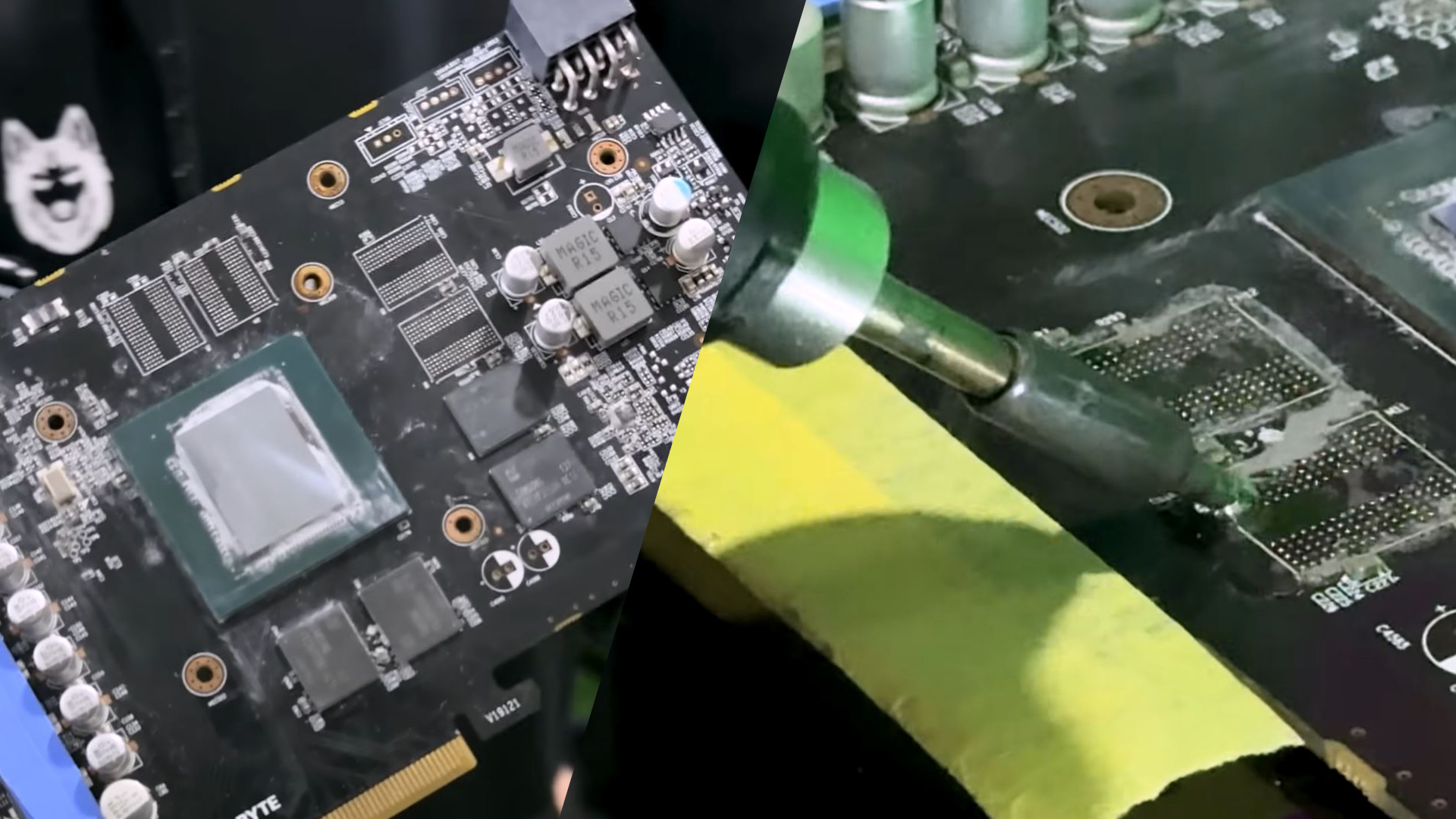
💡Shows how hardware mods can potentially unlock more VRAM for local AI model experimentation on budget GPUs.
⚡ 30-Second TL;DR
What Changed
GTX 1650 VRAM successfully upgraded from 4GB to 8GB
Why It Matters
While not a standard practice for production, this demonstrates the potential for extending the utility of older hardware for memory-intensive tasks like smaller model inference.
What To Do Next
Evaluate if your current entry-level GPU is VRAM-constrained for local inference and consider if hardware memory upgrades are viable for your specific model.
Key Points
- •GTX 1650 VRAM successfully upgraded from 4GB to 8GB
- •Performance nearly doubled in synthetic benchmarks
- •Modification is limited to specific TU106-based core versions
🧠 Deep Insight
AI-generated analysis for this event — not the original article.
🔑 Enhanced Key Takeaways
- •The modification process requires modifying the GPU BIOS (straps) to recognize the higher-density memory modules, as the original BIOS is hardcoded for 4GB.
- •This specific mod is primarily viable on GTX 1650 variants that utilize the TU106 or TU116 silicon, which are repurposed chips from higher-tier cards rather than the standard TU117.
- •Successful upgrades often involve using Samsung or Micron GDDR6 chips salvaged from other damaged graphics cards, requiring precise BGA (Ball Grid Array) soldering skills.
- •While synthetic benchmarks show significant gains, real-world gaming performance is often bottlenecked by the GTX 1650's limited memory bus width (128-bit) and lower CUDA core count.
- •The modding community has identified that this process is not universally applicable to all GTX 1650 cards, as many PCBs lack the necessary physical traces or power delivery components for 8GB configurations.
🛠️ Technical Deep Dive
- GPU Architecture: The mod targets GTX 1650 cards featuring TU106/TU116 dies, which support memory controllers capable of addressing higher VRAM capacities compared to the native TU117 die.
- Memory Configuration: The upgrade involves replacing four 1GB GDDR5/GDDR6 modules with four 2GB modules to reach the 8GB total.
- BIOS Modification: Users must utilize tools like NiBiTor or custom firmware patches to adjust memory straps and timing parameters to ensure stability with the new VRAM density.
- Power Requirements: Increasing VRAM capacity can slightly raise the power draw, though it typically remains within the limits of the PCIe slot's 75W delivery if no external power connector is present.
🔮 Future ImplicationsAI analysis grounded in cited sources
⏳ Timeline
Weekly AI Recap
Read this week's curated digest of top AI events →
👉Related Updates



AI-curated news aggregator. All content rights belong to original publishers.
Original source: cnBeta (Full RSS) ↗
This is a summary, not the original. Read the source, or get the weekly briefing.
Weekly AI briefing
One email a week. Unsubscribe anytime.