Microsoft Rewriting Windows 11 Legacy Dialogs with WinUI 3
💡Understand the shift in Windows UI architecture to better align your desktop app development with Microsoft's roadmap.
⚡ 30-Second TL;DR
What Changed
Transitioning from legacy components to WinUI 3 framework
Why It Matters
Standardizing UI components simplifies the development environment for Windows desktop applications. It reduces technical debt and ensures a more consistent user experience for AI-powered productivity tools.
What To Do Next
Review your Windows desktop application's UI components to ensure compatibility with the upcoming WinUI 3 standards.
Key Points
- •Transitioning from legacy components to WinUI 3 framework
- •Focusing on visual consistency and dark mode integration
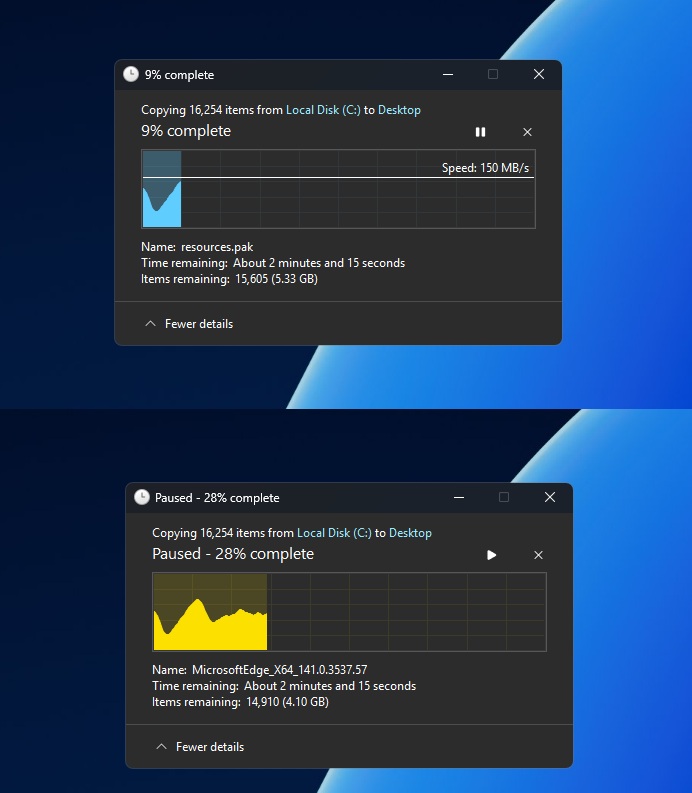
- •File copy dialogs are the first to receive the update
🧠 Deep Insight
Background and context from public sources — not the original article. 14 sources cited.
🔑 Enhanced Key Takeaways
- •WinUI 3 is delivered as part of the Windows App SDK, which decouples the UI framework from the operating system, enabling faster updates and the ability to bring new features to older Windows versions (Windows 10, version 1809 and later).
- •Microsoft is not only replacing the visual appearance but also the underlying implementation of legacy dialogs, moving away from web-based React Native and WebView2 architectures in core components like the Start menu.
- •The revamped Run dialog, a component that had retained its look for nearly three decades, is now faster and includes usability enhancements such as direct access to the home folder via the '~' shortcut.
- •Microsoft is actively optimizing the WinUI 3 framework itself, with performance being a major focus, using File Explorer and Notepad as primary benchmarks to achieve significant reductions in memory usage and launch times.
- •The company is developing internal tooling to scale the modernization process across numerous legacy dialogs, indicating a broader and more repeatable migration path from older frameworks to modern WinUI 3.
🛠️ Technical Deep Dive
- WinUI 3 is Microsoft's modern native user interface framework, delivered as part of the Windows App SDK.
- It is essentially the UWP XAML visual layer, but decoupled from UWP's restrictive deployment model.
- WinUI 3 applications can target Windows 10, version 1809 (build 17763) and later, including Windows 11.
- It supports traditional deployment methods and allows direct access to Win32 APIs.
- WinUI 3 applications exhibit noticeably faster startup times compared to UWP equivalents, primarily due to the absence of .NET Native compilation overhead, instead utilizing standard .NET JIT compilation.
- The framework combines the flexibility of the Win32 app model with the richness of modern Windows user experience (UX).
- Developers can build applications using .NET (C#) or C++ with XAML markup.
- Recent performance optimizations have resulted in a 41% reduction in memory allocations, a 63% drop in transient allocations, a 45% decrease in function calls, and a 25% reduction in the time spent executing WinUI code during File Explorer launch.
- WinUI 3 is compatible with both the 'UWP model' (sandboxed applications) and the traditional 'Win32' or 'desktop' application model, which offers largely unrestricted access to the operating system.
- A key API difference from UWP XAML is the change in namespace, with WinUI 3 namespaces beginning with 'Microsoft' (e.g.,
Microsoft.UI.Xaml) instead of 'Windows'. - Microsoft is also addressing visual issues such as "black tearing" during window resizing in WinUI 3 apps, aiming to achieve smooth resizing functionality similar to that found in UWP applications.
🔮 Future ImplicationsAI analysis grounded in cited sources
⏳ Timeline
📎 Sources (14)
Factual claims are grounded in the sources below. Forward-looking analysis is AI-generated interpretation.
Weekly AI Recap
Read this week's curated digest of top AI events →
👉Related Updates
AI-curated news aggregator. All content rights belong to original publishers.
Original source: cnBeta (Full RSS) ↗
This is a summary, not the original. Read the source, or get the weekly briefing.
The weekly digest
One email a week. Unsubscribe anytime.