Microsoft Expands Copilot AI Capabilities in Edge Browser
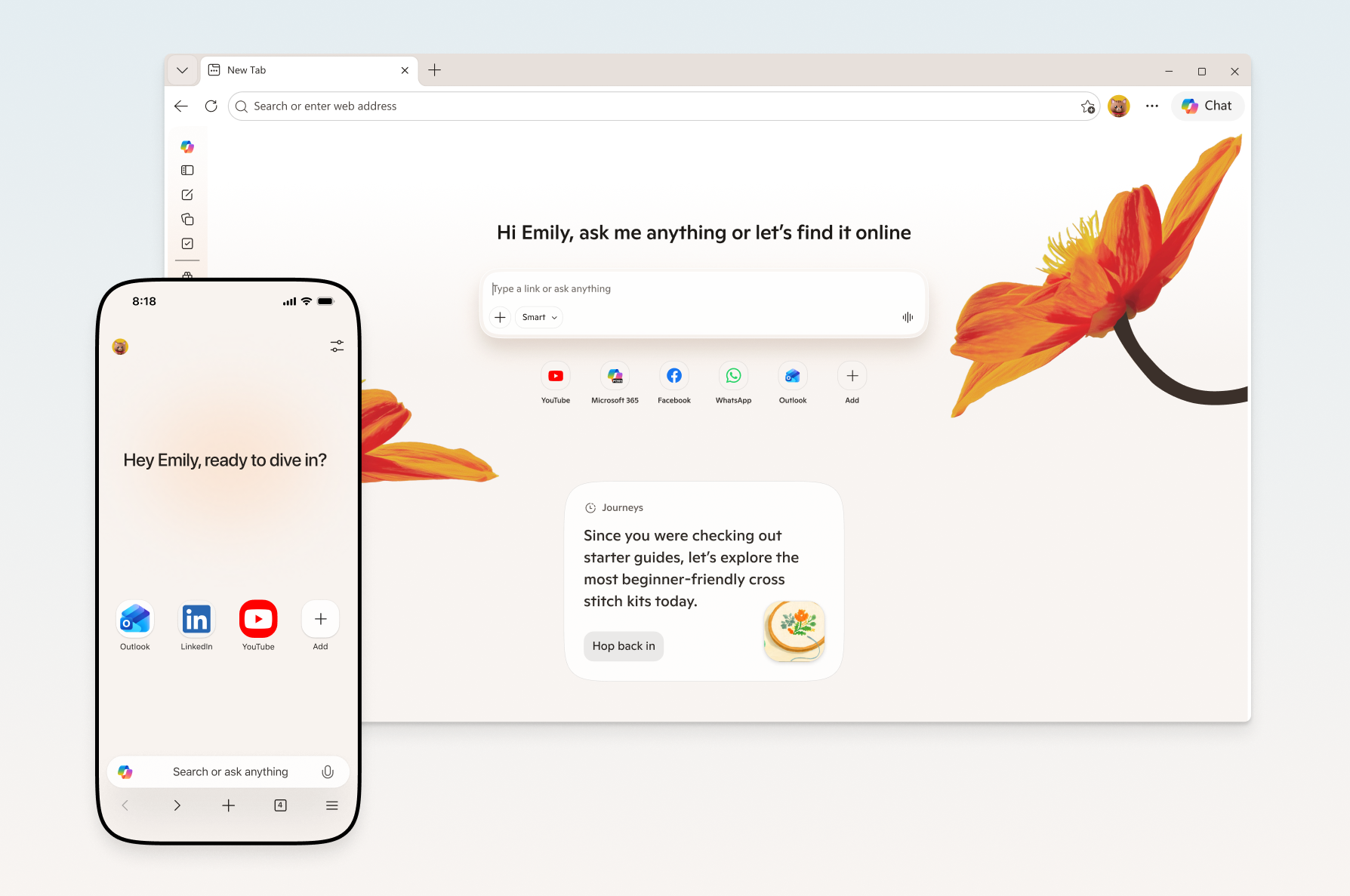
See how Microsoft is turning the browser into an AI-native workspace with new multimodal and reasoning tools.
30-Second TL;DR
What Changed
Introduced multi-tab reasoning for cross-page context awareness
Why It Matters
This update signals Microsoft's aggressive push to make Edge a primary AI-native interface, potentially changing how users interact with web content. It forces competitors to accelerate the integration of multimodal AI directly into browser environments.
What To Do Next
Explore the Edge Copilot API capabilities to see if your web-based applications can leverage these new multimodal hooks for better user engagement.
Key Points
- •Introduced multi-tab reasoning for cross-page context awareness
- •Added Vision and Voice capabilities for multimodal interaction
- •Integrated specialized study tools to assist with academic and research tasks
Deep Insight
Background and context from public sources — not the original article. 23 sources cited.
Enhanced Key Takeaways
- •Microsoft has retired the separate 'Copilot Mode' in Edge, integrating its core AI capabilities directly into the standard browser experience for a more seamless user interaction across desktop and mobile.
- •The updated Copilot in Edge now includes a 'long-term memory' feature, allowing it to access a user's browsing history (with explicit permission) to provide more personalized and contextually relevant responses for tasks like shopping or research.
- •The 'Journeys' feature, which organizes browsing history into topic-based cards with summaries, has been expanded to the Edge mobile app, enabling users to easily resume projects and pick up where they left off across devices.
- •New productivity tools on Edge desktop include a writing assistant that can draft, rewrite, or adjust the tone of text during entry, and a feature to convert open tabs into AI-powered podcasts, available in English-speaking markets.
- •Copilot in Edge can now provide more relevant answers by leveraging a user's past chats in addition to browsing history, further enhancing the quality of its assistance.
Competitor Analysis
- Microsoft Copilot in Edge
- Deeply integrated into Edge browser (desktop & mobile)
- Google Gemini in Chrome
- Integrated into Chrome, Google Workspace
- ChatGPT (with browser extensions/agents)
- Primarily standalone chatbot, some browser agents/plugins
- Claude Cowork (Desktop AI)
- Desktop AI, handles local files & applications
- Microsoft Copilot in Edge
- Multi-tab reasoning, browsing history, long-term memory
- Google Gemini in Chrome
- Deep Research, real-time web access, Workspace integration
- ChatGPT (with browser extensions/agents)
- Web browsing, Workspace Agents for team workflows
- Claude Cowork (Desktop AI)
- Autonomous multi-step tasks on local files/applications
- Microsoft Copilot in Edge
- Vision, Voice capabilities (desktop & mobile)
- Google Gemini in Chrome
- Multimodal AI
- ChatGPT (with browser extensions/agents)
- Conversational AI
- Claude Cowork (Desktop AI)
- Microsoft Copilot in Edge
- Study tools (quizzes, flashcards), writing assistant, podcast generation
- Google Gemini in Chrome
- Q&A, writing, project management automation (Notion AI)
- ChatGPT (with browser extensions/agents)
- Content creation, summarization, code generation
- Claude Cowork (Desktop AI)
- Microsoft Copilot in Edge
- Freemium (free tier, Copilot Pro for advanced features)
- Google Gemini in Chrome
- Free tier available, Gemini Advanced: $20/month
- ChatGPT (with browser extensions/agents)
- Free tier, ChatGPT Business: $25/user/mo
- Claude Cowork (Desktop AI)
- $200/month tiers (for advanced features)
- Microsoft Copilot in Edge
- OpenAI's GPT-4/GPT-5 series, Microsoft Prometheus model
- Google Gemini in Chrome
- Google's multimodal AI
- ChatGPT (with browser extensions/agents)
- OpenAI's models
- Claude Cowork (Desktop AI)
- Anthropic's models
- Microsoft Copilot in Edge
- User permission for browsing history/screen sharing
- Google Gemini in Chrome
- Native Google Workspace integration
- ChatGPT (with browser extensions/agents)
- Claude Cowork (Desktop AI)
- Local file access
- Microsoft Copilot in Edge
- Clear visual cues when active, no training on viewed content without permission, user control over data
- Google Gemini in Chrome
- ChatGPT (with browser extensions/agents)
- Enhanced security, collaboration (Enterprise/Teams)
- Claude Cowork (Desktop AI)
| Feature/Aspect | Microsoft Copilot in Edge | Google Gemini in Chrome | ChatGPT (with browser extensions/agents) | Claude Cowork (Desktop AI) |
|---|---|---|---|---|
| Core Integration | Deeply integrated into Edge browser (desktop & mobile) | Integrated into Chrome, Google Workspace | Primarily standalone chatbot, some browser agents/plugins | Desktop AI, handles local files & applications |
| Context Awareness | Multi-tab reasoning, browsing history, long-term memory | Deep Research, real-time web access, Workspace integration | Web browsing, Workspace Agents for team workflows | Autonomous multi-step tasks on local files/applications |
| Multimodal | Vision, Voice capabilities (desktop & mobile) | Multimodal AI | Conversational AI | |
| Productivity Tools | Study tools (quizzes, flashcards), writing assistant, podcast generation | Q&A, writing, project management automation (Notion AI) | Content creation, summarization, code generation | |
| Pricing Model | Freemium (free tier, Copilot Pro for advanced features) | Free tier available, Gemini Advanced: $20/month | Free tier, ChatGPT Business: $25/user/mo | $200/month tiers (for advanced features) |
| Underlying Models | OpenAI's GPT-4/GPT-5 series, Microsoft Prometheus model | Google's multimodal AI | OpenAI's models | Anthropic's models |
| Data Access | User permission for browsing history/screen sharing | Native Google Workspace integration | Local file access | |
| Privacy | Clear visual cues when active, no training on viewed content without permission, user control over data | Enhanced security, collaboration (Enterprise/Teams) |
Technical Deep Dive
- Foundation Models: Microsoft Copilot is built upon OpenAI's GPT-4 and GPT-5 series of large language models (LLMs). It also utilizes Microsoft's proprietary Prometheus model.
- Architecture: The Microsoft Copilot Stack employs a layered architecture consisting of four interconnected layers: User Experience, Orchestration, Execution, and Foundation Models.
- Orchestration Layer: This layer, represented by Microsoft 365 Copilot, identifies user intent from prompts, determines whether to fetch data from the public web or ground it in Microsoft Graph data, and aggregates information before sending it to Azure OpenAI services.
- Data Grounding: Copilot can ground its responses in a user's work data within the Microsoft Graph (including files, emails, Teams data) and public web data, ensuring responses are personalized and relevant.
- Privacy and Data Handling: When using features like Vision or accessing browsing history, Copilot requires explicit user permission. Microsoft states that no conversations or content are stored beyond the active session for Vision, and user inputs, images, and page content are not logged or stored for training models. Clear visual cues indicate when Copilot is active.
- Semantic Indexing: When Copilot 365 is activated for an organization, Microsoft also enables a feature known as semantic indexing to enhance its capabilities.
Future ImplicationsAI analysis grounded in cited sources
Timeline
- 2023-02Microsoft unveils Bing Chat, the precursor to Copilot, powered by GPT-4, integrated into Microsoft Bing and Edge.
- 2023-09-21Microsoft begins rebranding all variants of its AI assistant to 'Microsoft Copilot' and announces its rollout to Windows 11, Bing, Edge, and Microsoft 365.
- 2023-11-15Bing Chat is officially rebranded as Microsoft Copilot, unifying the AI experience across Microsoft products.
- 2024-01A dedicated Copilot key is announced for Windows keyboards, further cementing its role as an everyday AI companion.
- 2024-10-01Microsoft announces major overhaul for personal accounts, including UI changes, separation from Bing, and the addition of Copilot Voice and Copilot Vision.
- 2026-05-14Microsoft expands Copilot AI capabilities in Edge, introducing multi-tab reasoning, Vision, Voice, specialized study tools, long-term memory, and Journeys to both desktop and mobile, while retiring 'Copilot Mode'.
Sources (23)
Factual claims are grounded in the sources below. Forward-looking analysis is AI-generated interpretation.
Weekly AI Recap
Read this week's curated digest of top AI events →
AI-curated news aggregator. All content rights belong to original publishers.
Original source: TestingCatalog ↗
This is a summary, not the original. Read the source, or get the weekly briefing.
The weekly digest
One email a week. Unsubscribe anytime.