Mastering Git Worktrees for Efficient Development Workflows
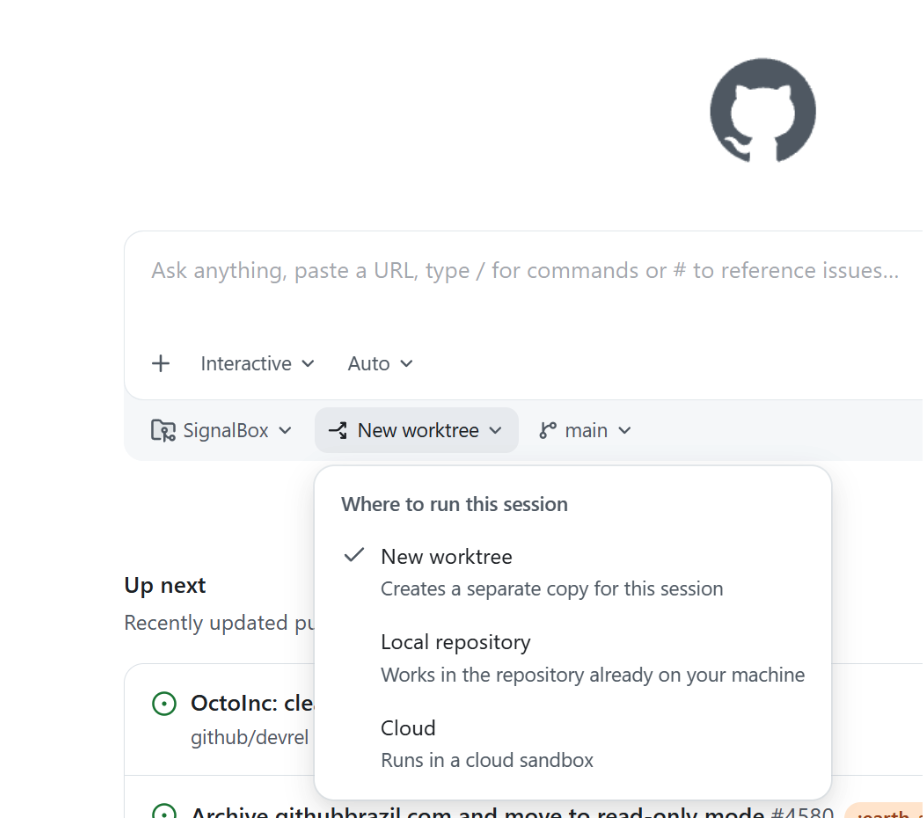
💡Learn how to manage multiple AI project branches without stashing or rebuilding your environment.
⚡ 30-Second TL;DR
What Changed
Git worktrees allow multiple branches to be checked out simultaneously in separate folders.
Why It Matters
Using worktrees significantly reduces the overhead of context switching, which is critical for developers managing complex AI model training scripts and application code concurrently.
What To Do Next
Run 'git worktree add <path> <branch>' in your current project to test managing two branches at once.
Key Points
- •Git worktrees allow multiple branches to be checked out simultaneously in separate folders.
- •Eliminates the need to stash changes or re-run build processes when switching contexts.
- •Ideal for managing long-running feature branches alongside hotfix branches.
🧠 Deep Insight
Background and context from public sources — not the original article. 25 sources cited.
🔑 Enhanced Key Takeaways
- •Git worktrees achieve significant resource efficiency by sharing the same underlying Git object database across all linked working directories, meaning commits and fetched changes are immediately visible everywhere, and only the working tree files are duplicated, not the entire repository history.
- •The feature has experienced a notable surge in adoption and relevance, particularly with the advent of AI coding agents, as it provides the necessary isolated and parallel environments for these agents to work on multiple tasks concurrently, thereby transforming AI-assisted development workflows.
- •Beyond simple hotfix management, Git worktrees are highly effective for advanced use cases such as parallel code reviews, isolated experimentation with new features, running concurrent build and test scripts on different branches, and optimizing CI/CD pipelines for multi-environment deployments.
- •A key constraint of Git worktrees is that a single branch cannot be checked out simultaneously in two different worktrees, a measure implemented by Git to prevent data corruption and maintain clear isolation of development contexts.
- •While offering substantial benefits, worktrees introduce considerations such as potential dependency bloat (where each worktree might require its own
node_modulesor virtual environment), the need for diligent manual cleanup of worktree directories, and ensuring compatibility with existing development tools and IDEs.
📊 Competitor Analysis▸ Show
| Feature / Method | Git Worktrees | git stash + git checkout | Multiple git clone |
|---|---|---|---|
| Context Switching | Seamless; switch directories, no stash/rebuild. | Requires stashing/committing, then switching, then popping/reverting; often involves rebuilds/re-indexing. | Requires switching between entirely separate repository directories. |
| Disk Space Usage | Minimal; shares object database, only working tree files duplicated. | Minimal for Git history, but local changes are stored in the stash. | High; duplicates entire repository history and working files for each clone. |
| Shared Git State | All worktrees share the same object database, branches, remotes, and tags; commits in one are visible in others. | Operates within a single repository's state; changes are temporarily hidden by stash. | Each clone has its own independent Git history and remote tracking, requiring explicit pushes/pulls to sync. |
| Dependency Isolation | Each worktree can maintain its own node_modules, virtual environments, and build artifacts. | Dependencies and build artifacts are tied to the single working directory and change with branch switches. | Each clone has completely isolated dependencies and build artifacts. |
| Cleanup | git worktree remove command for easy cleanup; git worktree prune for orphaned metadata. | git stash drop to remove stashed changes; no directory cleanup needed. | Manual deletion of entire cloned directories. |
🛠️ Technical Deep Dive
- When a new worktree is created, Git generates a new directory at the specified path.
- Inside this new directory, a
.gitfile (not a directory) is created. This file contains a plain-text path pointing back to the main repository's.gitdirectory. - The main repository maintains a private subdirectory for each linked worktree within its
$GIT_DIR/worktrees/directory (e.g.,.git/worktrees/<name>/). - This private subdirectory stores metadata specific to that worktree, including its
HEAD(the currently checked-out commit or branch) and itsindex(staging area). - All worktrees share the main repository's central object database, which contains all commits, blobs, and tree objects. This design minimizes disk space usage and ensures that commits made in one worktree are immediately visible across all others.
- Git prevents checking out the same branch in multiple worktrees simultaneously to avoid potential data conflicts and ambiguity.
🔮 Future ImplicationsAI analysis grounded in cited sources
node_modules) and the need for manual folder management will drive innovation in areas like content-addressable package managers, sparse checkouts, and automated worktree lifecycle management.⏳ Timeline
📎 Sources (25)
Factual claims are grounded in the sources below. Forward-looking analysis is AI-generated interpretation.
- medium.com
- joshtune.com
- robertmelton.com
- tutorialsdojo.com
- medium.com
- superset.sh
- understandingdata.com
- github.blog
- jetbrains.com
- youtube.com
- devdynamics.ai
- devot.team
- diginode.in
- gitcheatsheet.dev
- atomicobject.com
- stackoverflow.com
- medium.com
- medium.com
- git-init.com
- olafalders.com
- medium.com
- graphapp.ai
- simplebackups.com
- git-scm.com
- dev.to
Weekly AI Recap
Read this week's curated digest of top AI events →
👉Related Updates
AI-curated news aggregator. All content rights belong to original publishers.
Original source: GitHub Blog ↗
This is a summary, not the original. Read the source, or get the weekly briefing.
Weekly AI briefing
One email a week. Unsubscribe anytime.