Master .claude Folder for Claude Code Control
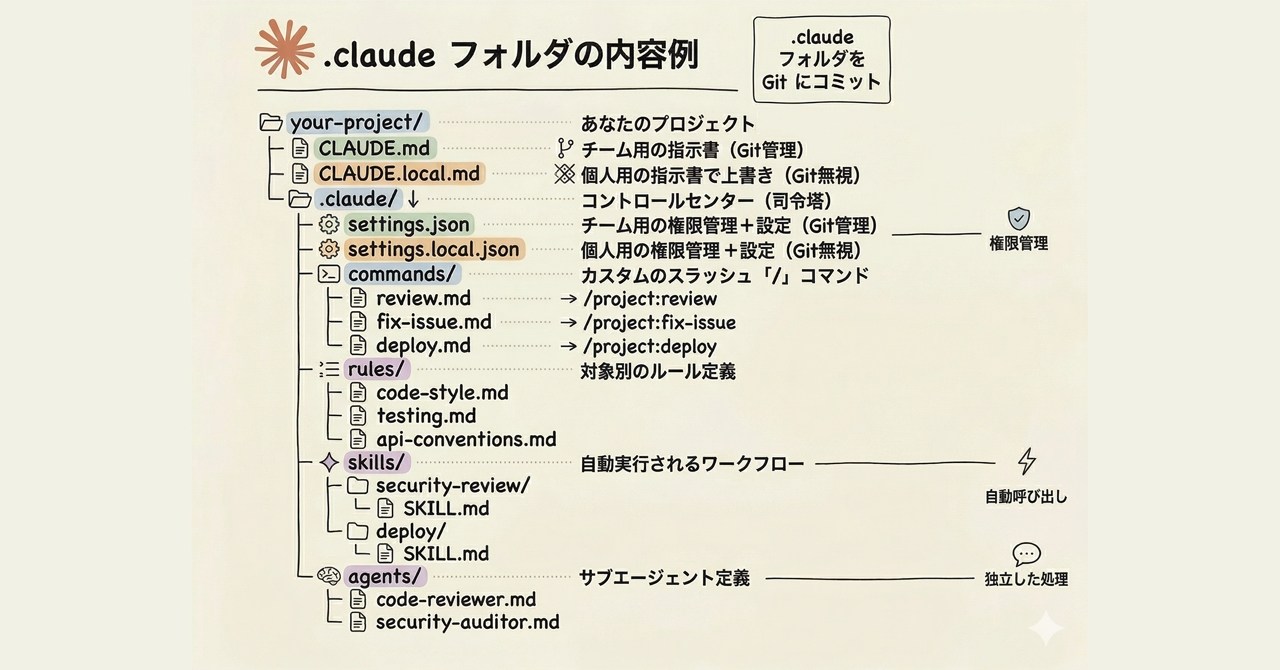
💡Control Claude Code precisely via .claude folder mastery
⚡ 30-Second TL;DR
What Changed
.claude folder controls Claude Code's project behavior
Why It Matters
Empowers developers to fine-tune Claude Code, boosting coding productivity and project control for AI practitioners using Anthropic tools.
What To Do Next
Inspect the .claude folder in your Claude Code project to customize its AI behavior.
Key Points
- •.claude folder controls Claude Code's project behavior
- •Auto-generated in projects when using Claude Code
- •Beginner-friendly breakdown of folder structure and roles
- •Essential for customizing AI coding workflow
🧠 Deep Insight
AI-generated analysis for this event — not the original article.
🔑 Enhanced Key Takeaways
- •The .claude directory functions as a local configuration hub, specifically housing the 'config.json' file which manages project-specific tool permissions, environment variables, and custom instructions that override global settings.
- •It acts as a state-persistence layer for Claude Code, storing session-specific metadata and history logs that allow the AI agent to maintain context across interrupted coding sessions within the same repository.
- •Security-conscious developers use the .claude folder to define 'ignore' patterns and restricted file access lists, preventing the AI agent from inadvertently reading sensitive credentials or build artifacts during the indexing process.
📊 Competitor Analysis▸ Show
| Feature | Claude Code (.claude) | GitHub Copilot Workspace | Cursor (Composer) |
|---|---|---|---|
| Configuration | Local .claude folder | .github/copilot/ | .cursor/rules/ |
| Agentic Control | High (CLI-first) | Medium (IDE-integrated) | High (IDE-integrated) |
| Pricing | Usage-based (API) | Subscription | Subscription/Usage |
| Primary Focus | Terminal-based autonomy | GitHub ecosystem integration | IDE-native development |
🛠️ Technical Deep Dive
- •Configuration Schema: The .claude/config.json file utilizes a JSON-schema validated structure that supports 'tools' key definitions, allowing users to explicitly enable or disable specific CLI tool capabilities (e.g., file system access, shell execution).
- •Context Window Management: The folder stores 'context.json' or similar state files that track the 'working set' of files, enabling the agent to perform RAG (Retrieval-Augmented Generation) on the local codebase without re-indexing the entire project on every prompt.
- •Environment Isolation: Supports local .env file referencing within the configuration, ensuring that API keys or environment-specific variables are scoped strictly to the project-level agent instance.
🔮 Future ImplicationsAI analysis grounded in cited sources
⏳ Timeline
Weekly AI Recap
Read this week's curated digest of top AI events →
👉Related Updates
AI-curated news aggregator. All content rights belong to original publishers.
Original source: ITmedia AI+ (日本) ↗
This is a summary, not the original. Read the source, or get the weekly briefing.
Weekly AI briefing
One email a week. Unsubscribe anytime.