Local Image Gen with Docker Model Runner
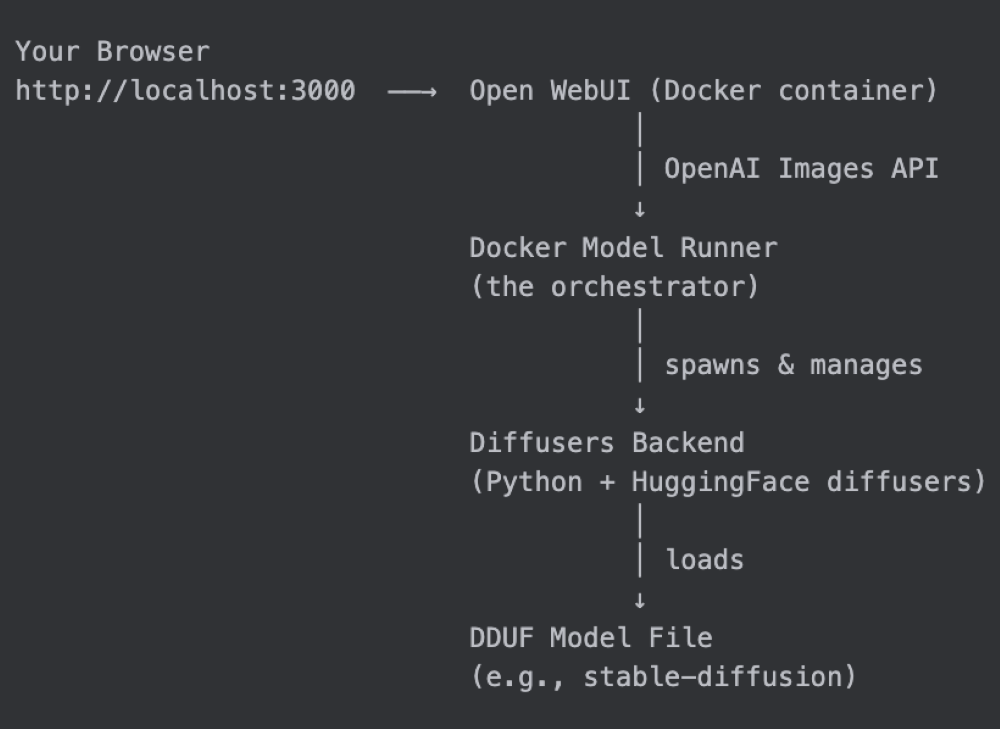
Local AI images via Docker: no credits, filters, or privacy leaks!
30-Second TL;DR
What Changed
Run AI image models locally in Docker containers
Why It Matters
Empowers AI practitioners with private, cost-free image generation, ideal for prototyping without vendor lock-in. Reduces reliance on proprietary cloud services, fostering open experimentation.
What To Do Next
Pull the Docker Model Runner image and launch with Open WebUI for instant local image gen.
Key Points
- •Run AI image models locally in Docker containers
- •Integrate with Open WebUI for intuitive web interface
- •Avoid cloud API costs, privacy risks, and content filters
Deep Insight
AI-generated analysis for this event — not the original article.
Enhanced Key Takeaways
- •Docker Model Runner leverages the OCI (Open Container Initiative) standard to package model weights and inference runtimes, ensuring environment parity across diverse local hardware configurations.
- •The integration utilizes the Ollama backend architecture for model management, allowing users to pull and serve quantized models (GGUF format) directly within the containerized environment.
- •By utilizing Docker's volume mounting capabilities, the solution enables persistent storage of model weights and generated assets, bypassing the ephemeral nature of standard container filesystems.
Competitor Analysis
- Docker Model Runner
- OCI Container
- LM Studio
- Desktop App
- Ollama (CLI/API)
- Binary/Service
- Docker Model Runner
- Open WebUI (External)
- LM Studio
- Built-in GUI
- Ollama (CLI/API)
- CLI / Third-party UI
- Docker Model Runner
- High (Any Docker host)
- LM Studio
- Medium (OS specific)
- Ollama (CLI/API)
- High (OS specific)
- Docker Model Runner
- Free (Open Source)
- LM Studio
- Free (Community)
- Ollama (CLI/API)
- Free (Open Source)
- Docker Model Runner
- Docker Engine/NVIDIA Container Toolkit
- LM Studio
- Native Driver Access
- Ollama (CLI/API)
- Native Driver Access
| Feature | Docker Model Runner | LM Studio | Ollama (CLI/API) |
|---|---|---|---|
| Deployment | OCI Container | Desktop App | Binary/Service |
| Interface | Open WebUI (External) | Built-in GUI | CLI / Third-party UI |
| Portability | High (Any Docker host) | Medium (OS specific) | High (OS specific) |
| Pricing | Free (Open Source) | Free (Community) | Free (Open Source) |
| Hardware Abstraction | Docker Engine/NVIDIA Container Toolkit | Native Driver Access | Native Driver Access |
Technical Deep Dive
- •Architecture: Utilizes a client-server model where the Docker container acts as the inference server (typically exposing an OpenAI-compatible API endpoint).
- •Hardware Acceleration: Relies on the NVIDIA Container Toolkit for GPU passthrough, enabling CUDA acceleration for local inference.
- •Model Format: Primarily supports GGUF (GPT-Generated Unified Format) for efficient memory usage and quantization, allowing large models to run on consumer-grade VRAM.
- •Networking: Uses Docker bridge networking to map container ports to the host, facilitating seamless communication between the Open WebUI container and the Model Runner container.
Future ImplicationsAI analysis grounded in cited sources
Timeline
- 2024-05Docker introduces official support for AI/ML workflows via Docker Desktop extensions.
- 2025-02Docker expands integration with Ollama to simplify local LLM deployment.
- 2026-04Docker announces the Model Runner initiative to standardize local AI model execution.
Weekly AI Recap
Read this week's curated digest of top AI events →
AI-curated news aggregator. All content rights belong to original publishers.
Original source: Docker Blog ↗
This is a summary, not the original. Read the source, or get the weekly briefing.
The weekly digest
One email a week. Unsubscribe anytime.