Disable Gemini in Google Apps
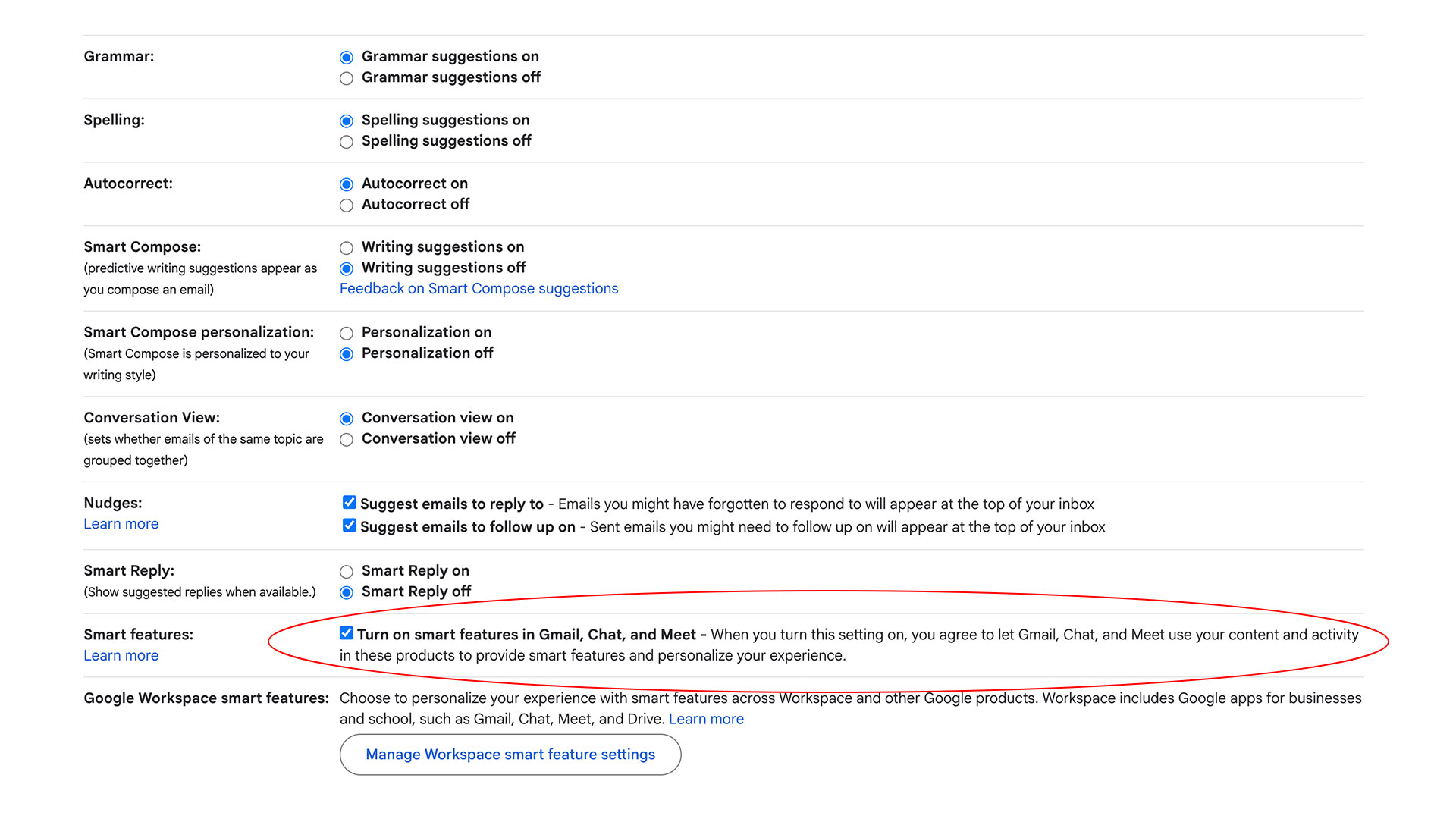
💡Step-by-step to banish Gemini distractions from Google Workspace – essential for focused AI work.
⚡ 30-Second TL;DR
What Changed
Disable 'Smart features in Gmail, Chat, and Meet' via Gmail General settings.
Why It Matters
This empowers Workspace users to eliminate AI distractions but reveals Google's design bundling Gemini with essential tools, discouraging opt-outs. AI practitioners can customize environments for focused work without unwanted suggestions.
What To Do Next
In Gmail settings, toggle off 'Smart features in Google Workspace' to remove Gemini while keeping basic corrections.
Key Points
- •Disable 'Smart features in Gmail, Chat, and Meet' via Gmail General settings.
- •Turn off 'Smart features in Google Workspace and other products' in settings.
- •Disabling affects spelling, grammar, autocorrect, Smart Compose, nudges, and priority inbox.
- •Smart features off by default in Japan, Switzerland, UK, EEA.
- •Recommendation: Keep basic smart features on, disable Workspace ones only.
🧠 Deep Insight
AI-generated analysis for this event — not the original article.
🔑 Enhanced Key Takeaways
- •The 'Smart features' toggle functions as a global privacy control that prevents Google from processing user data across products to build personalized models, which is why disabling it triggers a loss of functionality in non-AI features like Priority Inbox.
- •Enterprise and Education Workspace accounts often have these settings managed by administrators via the Google Admin console, meaning individual users may be unable to disable Gemini integrations if their organization has enforced them.
- •The distinction between 'Smart features' and 'Gemini' has blurred over time, as Google has migrated legacy machine learning features (like Smart Compose) into the Gemini-powered 'Help me write' and 'Gemini for Workspace' infrastructure.
📊 Competitor Analysis▸ Show
| Feature | Microsoft 365 Copilot | Google Workspace (Gemini) | Apple Intelligence |
|---|---|---|---|
| Primary Integration | Deep integration with Office apps | Deep integration with Drive/Gmail | OS-level integration (iOS/macOS) |
| Data Privacy | Enterprise-grade data boundary | User-level toggle for 'Smart features' | On-device processing focus |
| Model Architecture | GPT-4o / Custom | Gemini 1.5 Pro / Flash | Apple Foundation Models |
🛠️ Technical Deep Dive
- •The 'Smart features' toggle acts as a data-processing flag that restricts the Google Knowledge Graph and associated ML pipelines from accessing the user's private data (Gmail, Drive, Calendar) to generate contextual suggestions.
- •Disabling these features effectively disconnects the user's data from the 'Personalized Model' layer, which relies on real-time indexing of user content to power features like Smart Reply and Nudges.
- •In the Gemini for Workspace architecture, the 'Help me write' and 'Summarize' features utilize a separate API path from legacy 'Smart features,' meaning some users may still see Gemini prompts even after disabling legacy smart features if their admin has enabled the Gemini add-on.
🔮 Future ImplicationsAI analysis grounded in cited sources
⏳ Timeline
Weekly AI Recap
Read this week's curated digest of top AI events →
👉Related Updates

AI-curated news aggregator. All content rights belong to original publishers.
Original source: Engadget ↗
This is a summary, not the original. Read the source, or get the weekly briefing.
The weekly digest
One email a week. Unsubscribe anytime.