Codex gains remote desktop control via Computer Use
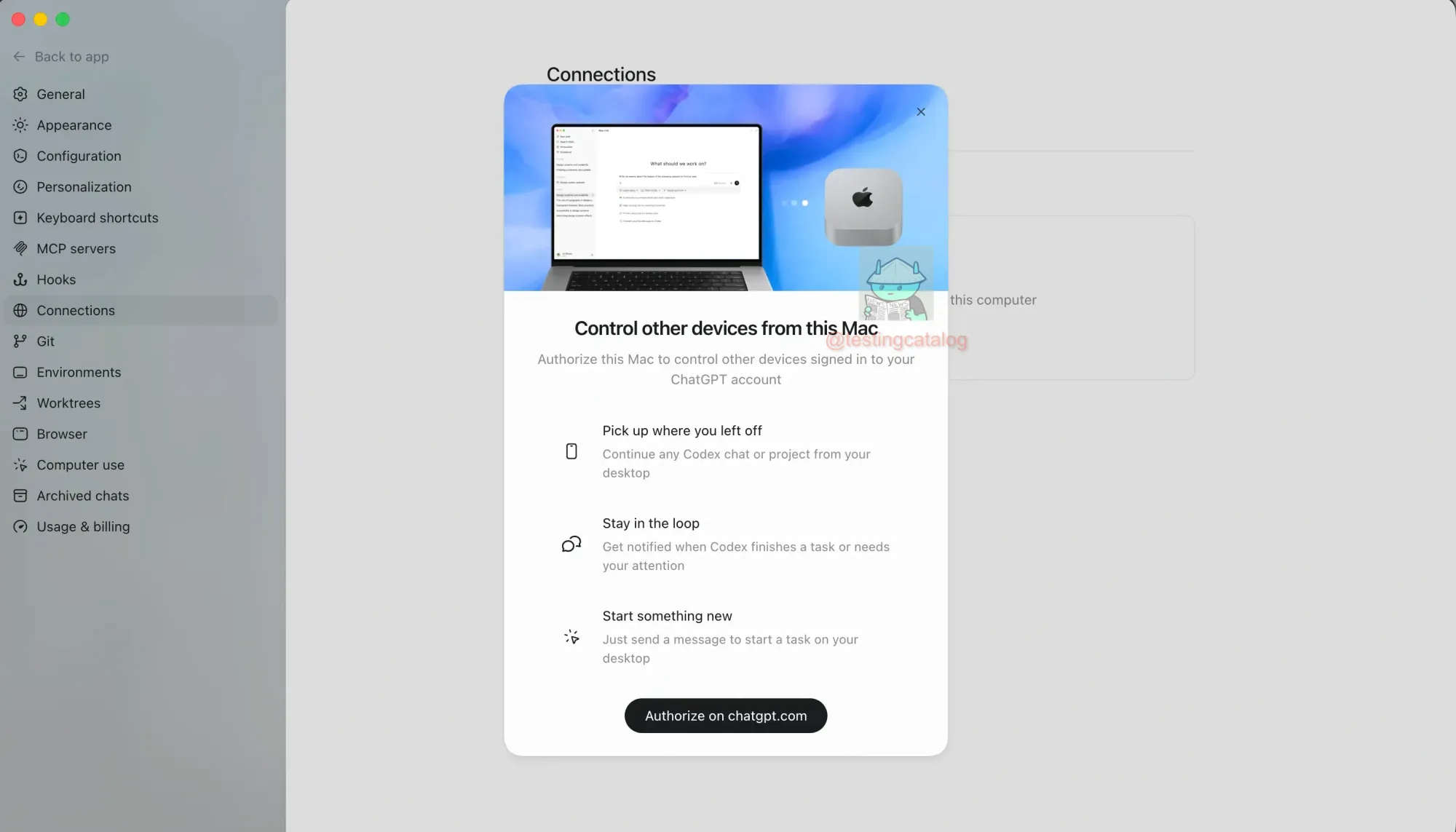
💡Codex can now control remote desktops without SSH, even while locked—a major leap for autonomous agent capabilities.
⚡ 30-Second TL;DR
What Changed
Codex now supports remote control of desktop devices via Computer Use.
Why It Matters
This advancement significantly lowers the barrier for autonomous agent deployment across heterogeneous hardware environments. It suggests a shift toward more seamless, agentic workflows that bridge the gap between cloud intelligence and local desktop hardware.
What To Do Next
Review the latest OpenAI Computer Use documentation to integrate cross-device automation into your agentic workflows.
Key Points
- •Codex now supports remote control of desktop devices via Computer Use.
- •Eliminates the need for SSH configuration for cross-device management.
- •Enables interaction with devices even when they are locked or in sleep mode.
🧠 Deep Insight
Web-grounded analysis with 18 cited sources.
🔑 Enhanced Key Takeaways
- •OpenAI's 'Computer Use' feature allows Codex to visually perceive and interact with graphical user interfaces on macOS, simulating human actions like clicking, typing, and scrolling, rather than relying solely on command-line tools or structured integrations.
- •The system operates through a continuous 'CUA Loop' where the AI model performs actions, receives screenshots to evaluate the results via OpenAI's vision API, and then iteratively determines the next step until a task is completed.
- •Remote desktop control via 'Computer Use' is currently available on macOS, with the Codex desktop app also available for Windows, though the 'Computer Use' feature specifically for macOS, and is not yet available in the European Economic Area, the United Kingdom, or Switzerland at launch.
- •The underlying technology for 'Computer Use' is a specialized Computer-Using Agent (CUA) model,
computer-use-preview, which integrates vision capabilities from GPT-4o with advanced reasoning, and is accessed through the Responses API. - •Codex can be controlled remotely from the ChatGPT mobile app or another Codex App host, leveraging the host's local resources including projects, files, plugins, and the 'Computer Use' feature.
📊 Competitor Analysis▸ Show
| Feature/Product | OpenAI Codex (Computer Use) | Anthropic Claude (Computer Use) | Simular Pro | Manus My Computer |
|---|---|---|---|---|
| Core Functionality | AI agent for coding & general productivity, operates GUI via screenshots (macOS), cloud-based agent with local app. | AI agent for general desktop control, interacts directly with native apps and web. | Real AI co-worker for desktop, automates across desktop environment (email, spreadsheets, CRMs, etc.), cloud-based virtual desktop. | Hybrid cloud-based agent with native desktop app, deep web research, content creation, complex workflow automation. |
| Technical Approach | CUA model (computer-use-preview) integrates GPT-4o vision, continuous CUA Loop (screenshot, action, evaluate). | Direct desktop control, visually perceives screen, interprets, and executes actions. | Secure, cloud-based virtual desktop isolated from personal machine, highly capable agent. | Hybrid architecture combining cloud agent with native desktop app for secure local integration. |
| Environment | Desktop app (macOS, Windows), 'Computer Use' on macOS, sandboxed virtual environment for code execution. | Direct control over user's desktop, native apps, terminal commands, file systems. | Cloud-based virtual desktop, feels like 'your' computer, always on/connected. | Native app for macOS/Windows, secure bridge between cloud agent and local file system. |
| Availability/Limitations | Available via ChatGPT Plus/Pro/Business/Enterprise plans. 'Computer Use' not in EEA, UK, Switzerland at launch. Requires Screen Recording/Accessibility permissions on macOS. | Public beta, API for AI-controlled computer interaction. | Usage-based pricing, oriented for production use, requires team consultation. | Native app for macOS/Windows, requires machine to be on and app running for 24/7 access. |
🛠️ Technical Deep Dive
- Codex operates on a large-scale transformer neural network architecture, descended from GPT-3 and extensively fine-tuned for code understanding and generation.
- The current Codex product wraps OpenAI's frontier models, such as GPT-4/4o and GPT-5.4/5.5, to provide its capabilities.
- The 'Computer Use' feature specifically leverages a specialized Computer-Using Agent (CUA) model,
computer-use-preview, which integrates vision capabilities from GPT-4o with advanced reasoning. - It functions through a continuous 'CUA Loop' that involves receiving natural language objectives, capturing the current screen state via OpenAI's vision API, interpreting the visual input, deciding on the next action (e.g., click, type, scroll), executing that action, and then evaluating the updated screen state.
- The Codex App Server acts as a bidirectional protocol, decoupling the core logic of the Codex coding agent from various client surfaces, including the CLI, VS Code extension, web app, and macOS desktop app.
- For execution, Codex utilizes a sandboxed, virtual computer environment, and on Windows, it can run natively in PowerShell with a native Windows sandbox to maintain bounded permissions.
- The 'Computer Use' tool is accessed via the Responses API, rather than the standard Chat Completions endpoint.
- Key architectural optimizations include stateless request handling for Zero Data Retention, strategic prompt caching for performance, automatic context window management through intelligent compaction, and robust handling of multi-turn conversations.
🔮 Future ImplicationsAI analysis grounded in cited sources
⏳ Timeline
📎 Sources (18)
Factual claims are grounded in the sources below. Forward-looking analysis is AI-generated interpretation.
- Google Search Source
- Google Search Source
- Google Search Source
- Google Search Source
- Google Search Source
- Google Search Source
- Google Search Source
- Google Search Source
- Google Search Source
- Google Search Source
- Google Search Source
- Google Search Source
- Google Search Source
- Google Search Source
- Google Search Source
- Google Search Source
- Google Search Source
- Google Search Source
Weekly AI Recap
Read this week's curated digest of top AI events →
👉Related Updates

AI-curated news aggregator. All content rights belong to original publishers.
Original source: TestingCatalog ↗