ClipboardAI syncs cross-device clipboard history for Apple users
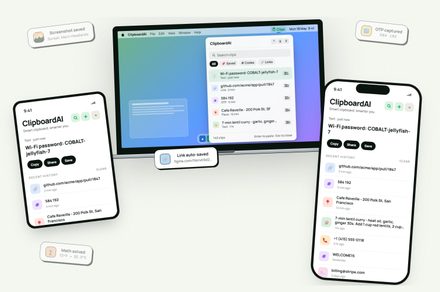
A productivity utility that solves the common developer pain point of cross-device clipboard fragmentation.
30-Second TL;DR
What Changed
Synchronizes text, links, code, and images across Apple ecosystem
Why It Matters
This tool improves productivity for developers and creators who frequently move code snippets or assets between mobile and desktop environments. It reduces friction in multi-device development setups.
What To Do Next
Evaluate ClipboardAI's integration capabilities to see if it can automate your snippet management workflow between mobile research and desktop coding.
Key Points
- •Synchronizes text, links, code, and images across Apple ecosystem
- •Features a searchable history for quick retrieval of past clips
- •Designed to solve fragmentation in cross-device copy-paste workflows
Deep Insight
AI-generated analysis for this event — not the original article.
Enhanced Key Takeaways
- •ClipboardAI utilizes end-to-end encryption (E2EE) to ensure that sensitive clipboard data, such as passwords or private keys, remains inaccessible to the service provider during transit.
- •The application leverages Apple's 'Universal Clipboard' framework but extends its functionality by providing a persistent, local-first database that survives device reboots and connectivity drops.
- •It incorporates an AI-driven categorization engine that automatically tags clips as 'Code,' 'URL,' 'Address,' or 'Image' to improve searchability within the history interface.
- •The utility offers a 'Privacy Zone' feature, allowing users to blacklist specific applications (like password managers or banking apps) from being tracked by the clipboard history.
- •ClipboardAI supports cross-platform integration via a companion API, enabling developers to push data directly into the clipboard history from third-party automation tools like Shortcuts or Raycast.
Competitor Analysis
- ClipboardAI
- Cloud/E2EE
- Apple Universal Clipboard
- iCloud (Native)
- Paste (App)
- iCloud/Local
- CopyClip
- Local Only
- ClipboardAI
- Yes
- Apple Universal Clipboard
- No
- Paste (App)
- Yes
- CopyClip
- Yes
- ClipboardAI
- Yes
- Apple Universal Clipboard
- No
- Paste (App)
- No
- CopyClip
- No
- ClipboardAI
- Subscription/Freemium
- Apple Universal Clipboard
- Free (Built-in)
- Paste (App)
- Paid
- CopyClip
- Free
| Feature | ClipboardAI | Apple Universal Clipboard | Paste (App) | CopyClip |
|---|---|---|---|---|
| Sync Method | Cloud/E2EE | iCloud (Native) | iCloud/Local | Local Only |
| Searchable History | Yes | No | Yes | Yes |
| AI Categorization | Yes | No | No | No |
| Pricing | Subscription/Freemium | Free (Built-in) | Paid | Free |
Technical Deep Dive
- Architecture: Employs a local SQLite database for persistent storage on each device, synchronized via a custom WebSocket-based relay server.
- Encryption: Implements AES-256 encryption for data at rest and TLS 1.3 for data in transit.
- AI Model: Uses a lightweight, on-device transformer model (distilled BERT variant) for text classification and entity extraction.
- Sync Protocol: Utilizes a delta-sync mechanism to minimize bandwidth usage by only transmitting changes rather than the full clipboard buffer.
Future ImplicationsAI analysis grounded in cited sources
Timeline
- 2026-02ClipboardAI enters private beta testing for select Apple ecosystem power users.
- 2026-05Version 1.0 release introduces the AI-driven categorization engine and Privacy Zone features.
- 2026-06Official public launch and feature coverage by major tech publications.
Weekly AI Recap
Read this week's curated digest of top AI events →
AI-curated news aggregator. All content rights belong to original publishers.
Original source: Digital Trends ↗
This is a summary, not the original. Read the source, or get the weekly briefing.
The weekly digest
One email a week. Unsubscribe anytime.