GitHub Unveils Copilot CLI Command Cheat Sheet
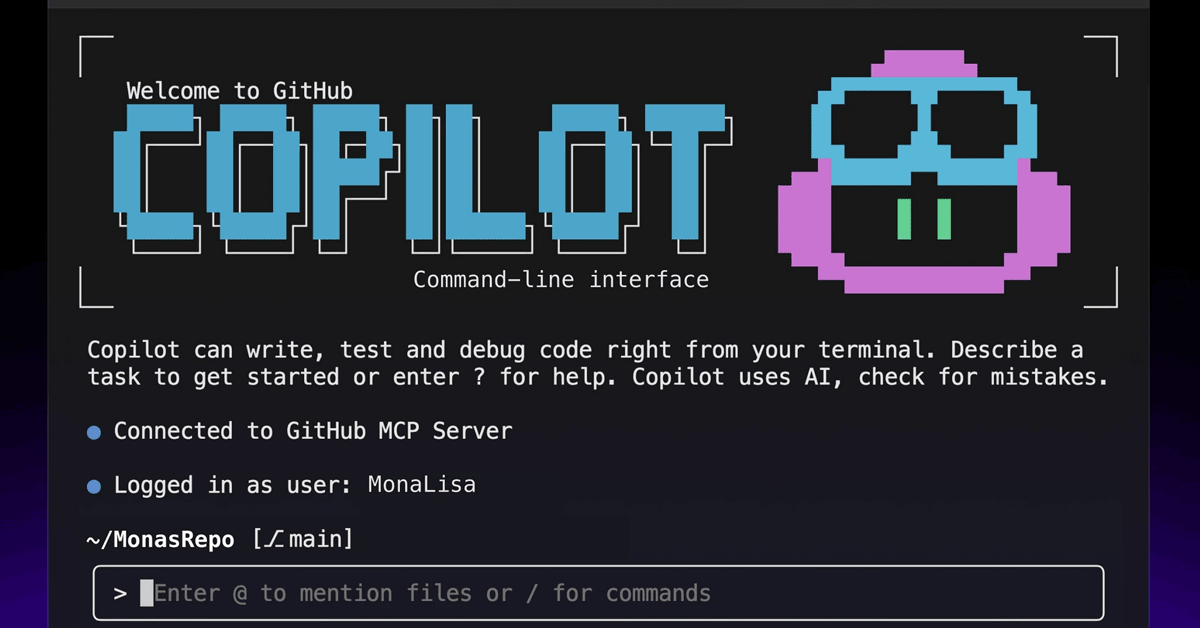
💡New Copilot CLI cheatsheet supercharges terminal coding—no UI switching needed.
⚡ 30-Second TL;DR
What Changed
Official cheat sheet for slash commands
Why It Matters
Developers can execute quick, repeatable actions in the terminal without switching to editors or web UI.
What To Do Next
Visit GitHub blog to copy Copilot CLI slash commands into your terminal workflow.
Key Points
- •Official cheat sheet for slash commands
- •Enables terminal-only quick actions
- •Avoids switching to editor or web UI
- •Supports iterative developer workflows
🧠 Deep Insight
Background and context from public sources — not the original article. 8 sources cited.
🔑 Enhanced Key Takeaways
- •GitHub Copilot CLI slash commands enable developers to perform explicit terminal actions (/clear, /add-dir, /cwd, /model, /session) without natural-language prompts, increasing speed, predictability, and auditability[1]
- •Slash commands are available across multiple Copilot interfaces including Copilot CLI, Copilot Chat, and agent mode, providing consistent keyboard-driven workflows[2]
- •Context management commands (/usage, /context, /compact) allow developers to monitor and manually manage token usage, with automatic compression triggered at 95% capacity[7]
- •Custom prompt creation via /generateInstructions and /savePrompt commands enables teams to build reusable, repository-level instructions and extract prompts from conversation threads[3]
- •Slash commands support accessibility features and compliance requirements by providing explicit control over file access scope, session context, and model selection without relying on natural-language interpretation[1]
🛠️ Technical Deep Dive
- Slash commands are prefixed with
/and instantly trigger context-aware actions within the CLI environment - Core shortcuts include
Esc(cancel operation),Ctrl+C(cancel/clear/exit),Ctrl+L(clear screen),@(mention files),/(show commands), and arrow keys (navigate history)[5] - Non-interactive mode supports programmatic usage via
-pflag for single prompts and-sflag to output only Copilot's response, enabling CI/CD pipeline integration and scripted automation[5] - Context window management uses automatic compression when approaching 95% token limit and warns when less than 20% remains[7]
- Skills can be manually invoked via slash commands (e.g.,
/Markdown-Checker check README.md) or automatically triggered when relevant to current task[8] - Hooks provide programmable control at session lifecycle points (preToolUse, postToolUse, userPromptSubmitted, sessionStart, sessionEnd, errorOccurred, agentStop, subagentStop) for enforcing guardrails, logging, and policy checks[8]
- Custom slash commands can be created via markdown files in designated folders, allowing teams to extend functionality beyond default system prompts[6]
🔮 Future ImplicationsAI analysis grounded in cited sources
The formalization of slash commands in GitHub Copilot CLI represents a shift toward explicit, auditable AI-assisted development workflows. By prioritizing keyboard-driven, repeatable commands over natural-language prompts, GitHub is addressing enterprise concerns around compliance, security, and predictability in AI-assisted coding. The extensibility of custom commands and hooks suggests a future where development teams can enforce organizational policies and guardrails directly within terminal-based AI workflows, potentially reducing friction in adopting AI tools in regulated industries. Integration across Copilot Chat, CLI, and agent mode indicates GitHub's strategy to create a unified AI assistant ecosystem that maintains consistency across different developer interfaces.
⏳ Timeline
📎 Sources (8)
Factual claims are grounded in the sources below. Forward-looking analysis is AI-generated interpretation.
- letsdatascience.com — Copilot Cli Introduces Slash Command Controls 5c570740
- github.blog — A Cheat Sheet to Slash Commands in Github Copilot Cli
- learn.microsoft.com — Release Notes
- GitHub — 1044
- docs.github.com — Cli Getting Started
- GitHub — 1113
- dev.to — Github Copilot Cli a Devops Engineers Practical Guide to AI Powered Terminal Automation 1jh0
- docs.github.com — Comparing Cli Features
Weekly AI Recap
Read this week's curated digest of top AI events →
👉Related Updates
AI-curated news aggregator. All content rights belong to original publishers.
Original source: ITmedia AI+ (日本) ↗
This is a summary, not the original. Read the source, or get the weekly briefing.
Weekly AI briefing
One email a week. Unsubscribe anytime.