📱Engadget•Freshcollected in 61m
Claude Cowork Moves Into Chrome’s Sidebar
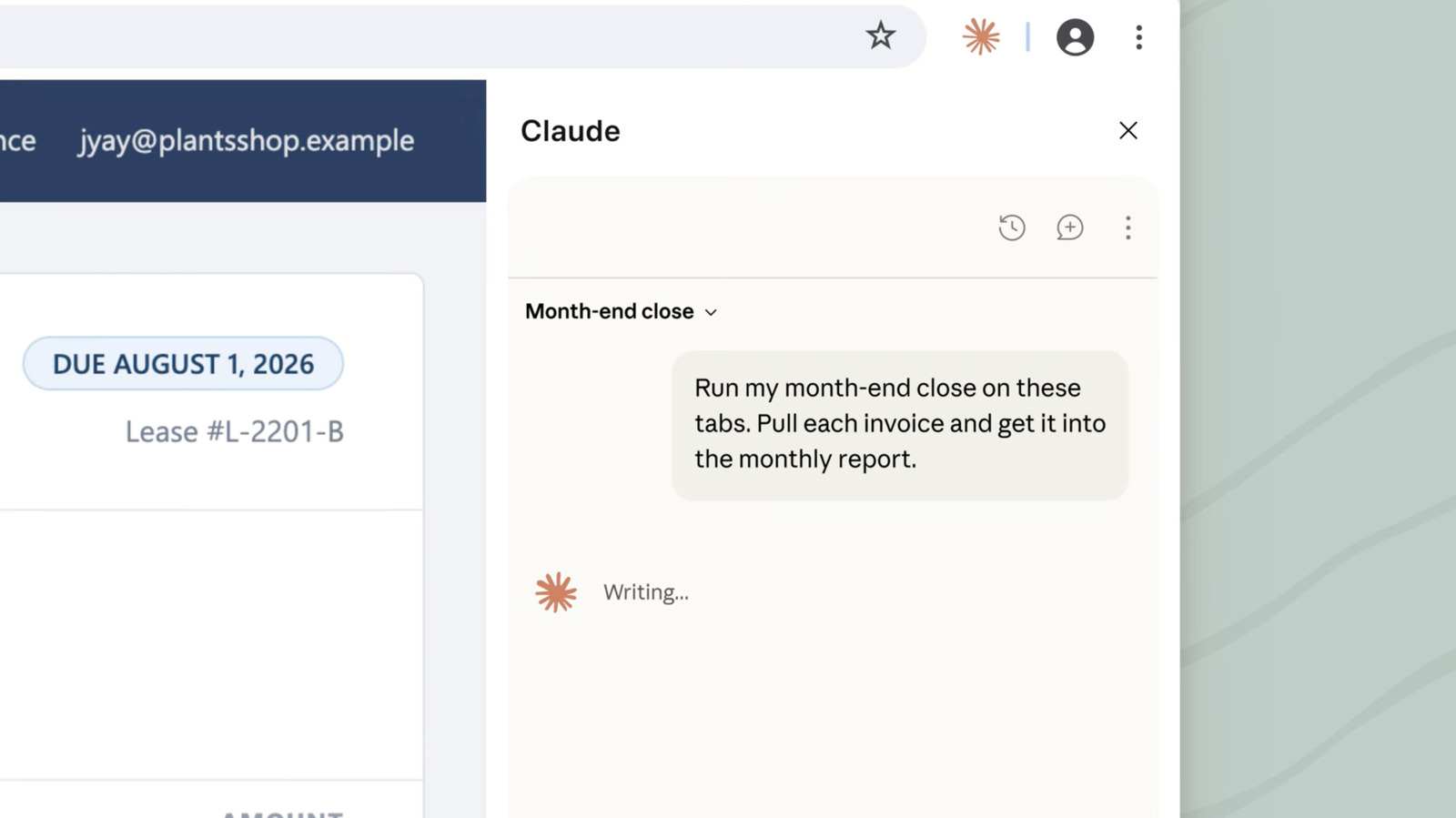
💡See how Claude Cowork’s Chrome sidebar could streamline browser-based AI workflows.
⚡ 30-Second TL;DR
What Changed
Claude Cowork is now available from a Chrome sidebar.
Why It Matters
A persistent sidebar can reduce context switching and make Claude easier to use during browser-based workflows. For AI builders, it signals a continued shift toward embedding assistants directly into everyday work surfaces.
What To Do Next
Install Anthropic’s Chrome extension and test Claude Cowork in the sidebar against your current browser-based agent workflow.
Who should care:Developers & AI Engineers
Key Points
- •Claude Cowork is now available from a Chrome sidebar.
- •The feature is delivered through Anthropic’s browser extension.
- •Users can keep Claude conversations accessible while browsing or completing browser-based tasks.
🧠 Deep Insight
AI-generated analysis for this event.
🔑 Enhanced Key Takeaways
- •The Claude Cowork sidebar integration is designed to support 'agentic' workflows, allowing the model to interact with web elements rather than just providing text-based assistance.
- •Anthropic has implemented specific context-window management for the sidebar to ensure that browser-based tasks do not consume excessive memory or degrade performance during long sessions.
- •The extension utilizes a persistent connection to Anthropic's API, enabling real-time synchronization of chat history between the sidebar and the main Claude web interface.
- •Security protocols for the sidebar include granular permission controls, allowing users to restrict which websites or domains Claude Cowork can access or analyze.
- •This release marks a strategic shift for Anthropic toward 'in-context' computing, positioning Claude as a persistent workspace companion rather than a standalone chatbot.
📊 Competitor Analysis▸ Show
| Feature | Claude Cowork (Sidebar) | Google Gemini (Side Panel) | Microsoft Copilot (Edge Sidebar) |
|---|---|---|---|
| Primary Focus | Agentic task automation | Google Workspace integration | Microsoft 365/OS integration |
| Pricing | Included in Pro/Team plans | Included in Gemini Advanced | Included in Windows/M365 |
| Context Access | Browser DOM/Active Tab | Google Drive/Docs/Gmail | System-wide/Edge browser |
🛠️ Technical Deep Dive
- The extension leverages a Chrome-native side panel API to maintain state persistence across tab navigation.
- Utilizes a WebSocket-based communication layer to stream model responses with low latency directly into the sidebar UI.
- Implements a sandboxed execution environment for browser-based actions to prevent unauthorized cross-site scripting or data exfiltration.
- Employs a lightweight local caching mechanism to store recent conversation turns, reducing API call frequency for repetitive queries.
🔮 Future ImplicationsAI analysis grounded in cited sources
Anthropic will expand Claude Cowork to support cross-browser compatibility beyond Chrome.
The current reliance on Chrome-specific APIs limits market reach, necessitating a move to WebExtensions standards to capture Firefox and Safari users.
The sidebar will evolve to include 'proactive' agentic triggers based on user browsing patterns.
Moving from reactive chat to proactive assistance is the logical progression for agentic AI tools integrated directly into the browser environment.
⏳ Timeline
2024-03
Anthropic releases Claude 3 model family with improved reasoning capabilities.
2024-10
Anthropic introduces 'Computer Use' capability, allowing models to interact with computer interfaces.
2025-05
Anthropic launches Claude Cowork as a dedicated agentic workspace for teams.
2026-08
Claude Cowork browser extension launches, bringing agentic capabilities to the Chrome sidebar.
📰
Weekly AI Recap
Read this week's curated digest of top AI events →
👉Related Updates

AI-curated news aggregator. All content rights belong to original publishers.
Original source: Engadget ↗