Claude Connects Browser Tabs to Desktop Workflows
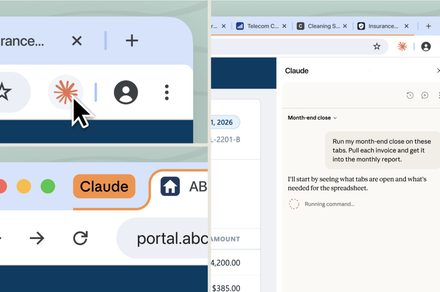
💡See how Claude now carries browser context, skills, and connectors into desktop workflows.
⚡ 30-Second TL;DR
What Changed
Conversations can carry over between Claude in Chrome and other Claude applications.
Why It Matters
The update reduces context switching for users who combine web research with desktop-based AI tasks. For AI builders, it signals a stronger focus on cross-surface continuity and agent-like workflows around browser data.
What To Do Next
Test Claude in Chrome with your existing connectors and a multi-step tab research workflow to assess context continuity.
Key Points
- •Conversations can carry over between Claude in Chrome and other Claude applications.
- •Skills and connectors are now available across browser and desktop workflows.
- •Claude can pull data from open browser tabs to support ongoing tasks.
🧠 Deep Insight
AI-generated analysis for this event.
🔑 Enhanced Key Takeaways
- •The integration utilizes a new 'Context Bridge' API that allows Claude to maintain state persistence across local browser storage and Anthropic's cloud-based desktop environment.
- •Privacy controls have been updated to include a 'Tab-Specific Permission' toggle, allowing users to restrict Claude's access to only selected browser tabs rather than the entire browsing session.
- •This update introduces 'Live-Sync' capabilities, enabling Claude to react in real-time to changes in browser-based documents like Google Docs or Notion pages without requiring a manual refresh.
- •The feature leverages Anthropic's 'Computer Use' capability, which was previously limited to desktop environments, now optimized for browser-based DOM interaction.
- •Enterprise users gain centralized administrative controls to manage which browser-based connectors are accessible to employees, ensuring compliance with data loss prevention (DLP) policies.
📊 Competitor Analysis▸ Show
| Feature | Claude (Browser/Desktop) | ChatGPT (Advanced Voice/Canvas) | Google Gemini (Workspace) |
|---|---|---|---|
| Cross-Platform State | High (Full Sync) | Medium (History Sync) | High (Ecosystem Sync) |
| Browser Integration | Deep (Tab Context) | Shallow (Search/Browse) | Deep (Native Workspace) |
| Computer Use | Yes (Active Control) | No | Limited (Automation) |
| Pricing | Pro/Team Subscription | Plus/Team Subscription | Gemini Advanced/Business |
🛠️ Technical Deep Dive
- Utilizes a secure WebSocket connection between the browser extension and the Claude desktop client to minimize latency during data transfer.
- Implements a local vector database within the browser extension to index tab content for rapid retrieval without sending full page payloads to the server.
- Employs a sandboxed environment for the 'Computer Use' agent to interact with browser elements, preventing unauthorized system-level access.
- Uses OAuth 2.0 for managing connector authentication, ensuring that browser-based tokens are securely shared with the desktop application.
🔮 Future ImplicationsAI analysis grounded in cited sources
⏳ Timeline
Weekly AI Recap
Read this week's curated digest of top AI events →
👉Related Updates
AI-curated news aggregator. All content rights belong to original publishers.
Original source: Digital Trends ↗